
- Introduction to SureContact Dashboard
- How to Install and Connect the SureContact WordPress Plugin
- What Do Contact Fields Mean in the SureContact WordPress Plugin
- How to Invite Members to a Workspace in SureContact
- How to Switch Organizations in SureContact
- Workspace-Level Contact Allocation in SureContact
- Workspace-Level Timezone Settings in SureContact
- How to Add a Custom Tracking Domain in a Workspace in SureContact
Contact Statuses
SureContact assigns every contact a status that represents their current state of communication eligibility and deliverability. These statuses help you understand whether a contact can receive emails, has opted out, or is invalid.
Currently, SureContact includes four contact statuses:
- Active
- Invalid
- Unsubscribed
- Bounced
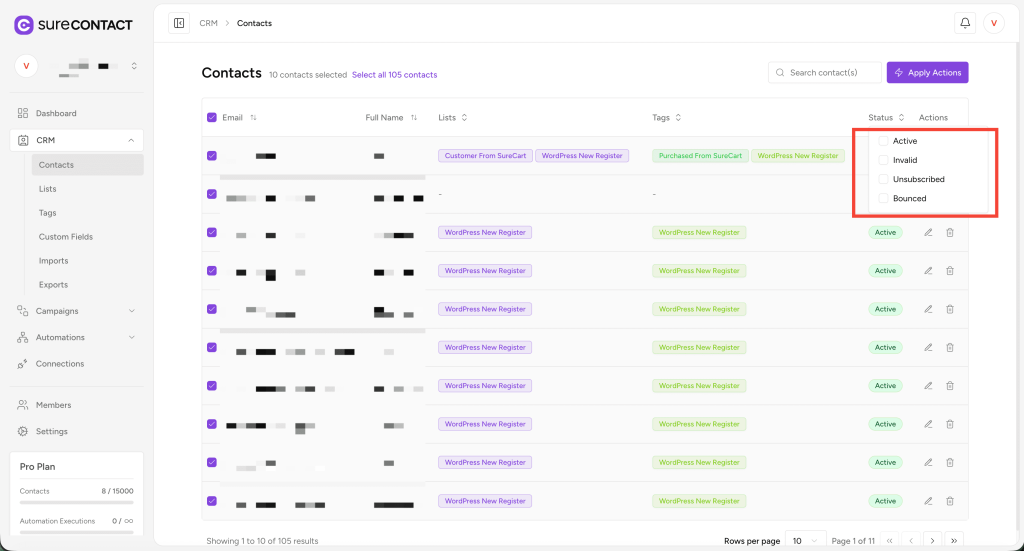
Each status plays a critical role in ensuring healthy email deliverability and complying with communication standards.
Active
Definition:
Contacts marked as Active are fully valid and eligible to receive your email campaigns and communications.
When a contact becomes Active:
- When successfully added or imported with a valid email address
- When manually updated to Active
- When no issues occur with email delivery
What you can do with Active contacts:
- Send email campaigns
- Add to lists and tags
- Use in automations
- Track engagement normally
Notes:
This is the default and desired status for any contact you plan to communicate with.
Invalid
Definition:
A contact is marked Invalid when the email address format is incorrect or unusable.
When a contact becomes Invalid:
- Email address is incomplete or contains errors (e.g., missing domain or @ symbol)
- Manually marked as Invalid
- Imported with incorrect formatting
What happens to Invalid contacts:
- They cannot receive emails
- They may cause errors if used in campaigns
- Should be corrected or removed to maintain deliverability quality
Notes:
It’s recommended to fix the email address or delete the contact if the correct address cannot be recovered.
Unsubscribed
Definition:
Contacts marked as Unsubscribed have opted out of receiving marketing emails.
How a contact becomes Unsubscribed:
- The contact manually clicks “Unsubscribe” in any email footer
- You manually set the status to Unsubscribed
- The contact requests removal from email communication
What happens with Unsubscribed contacts:
- You cannot send promotional or automated marketing emails to them
- They remain in your CRM for record-keeping
- You may still send transactional or account-related emails (depending on your compliance settings)
Notes:
This status helps maintain compliance with GDPR, CAN-SPAM, and email marketing laws.
Bounced
Definition:
A Bounced status indicates that SureContact attempted to send an email but was unable to deliver it.
Types of Bounces:
- Hard Bounce:
Permanent delivery issues, such as:
- Email address does not exist
- Domain no longer valid
- Soft Bounce:
Temporary issues such as:
- Mailbox full
- Server down
- Temporary provider issue
When a contact becomes Bounced:
- When SureContact receives a bounce notification from your SMTP provider
- Repeated soft bounces that get classified as permanent
What happens with Bounced contacts:
- System stops sending emails to them to protect your sender’s reputation
- They may affect your email deliverability if not managed properly
Notes:
It’s recommended to review bounced contacts and update or remove invalid ones.
Summary Table
| Status | Description | Can Receive Emails? | Typical Cause |
| Active | Valid, reachable, engaged contact | ✅ Yes | Normal, successful addition |
| Invalid | Incorrect or malformed email | ❌ No | Wrong formatting, incomplete email |
| Unsubscribed | Contact opted out of communication | ❌ No | User request or unsubscribe action |
| Bounced | Email delivery failed | ❌ No | Invalid email, server issues, mailbox full |
We don't respond to the article feedback, we use it to improve our support content.