Sending an email feels simple.
You write a message. You click send. It disappears and (hopefully) ends up in someone’s inbox.
But what happens after you click send is not simple at all.
Between your email tool and your audience, there’s a powerful filtering system that decides whether your email deserves to arrive in the inbox or be sent to spam or ignored entirely.
Gmail, Outlook, Yahoo and other inbox providers aren’t just delivery channels. They are guardians of the inbox. Their job is to protect users from emails they don’t want.
That’s why many teams face the same problems:
- Emails are sent but rarely opened
- Clicks and sales slowly decline
- Messages start landing in spam or promotions
- Unsubscribes increase
- Campaigns that once worked stop performing
Sending an email doesn’t guarantee visibility and deliverability isn’t a feature you turn on.
It’s trust you earn over time.
Think of deliverability like a reputation score. Every email you send either strengthens or weakens that score.
Inbox providers continuously update this score based on how your emails behave and how people react to them.
This guide explains email deliverability in simple language. Not just what to do, but why things work the way they do.
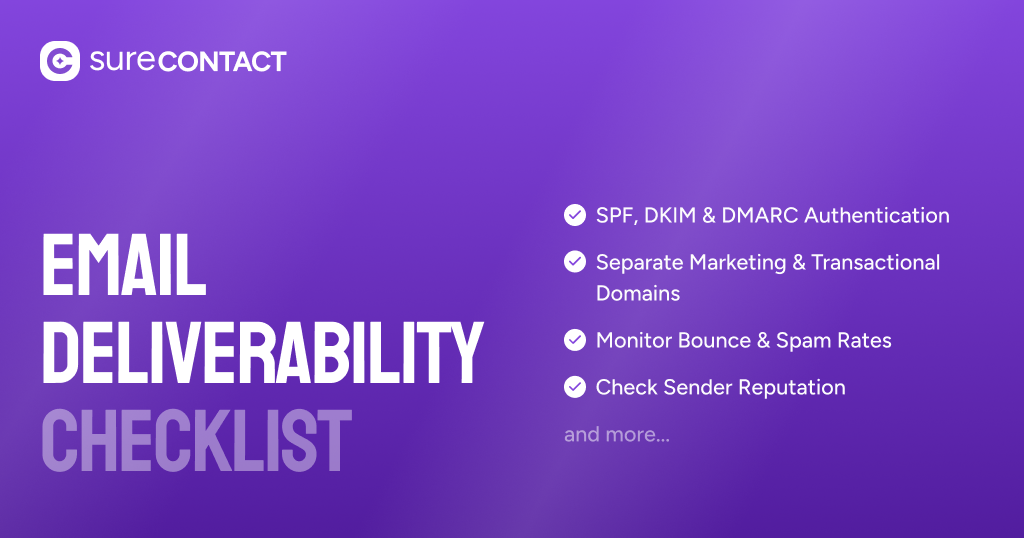
If you want to apply these concepts to your own setup, use our email deliverability audit checklist to review domains, DNS, tools, lists, and sending behavior step by step.
By the end, you will understand how emails travel, how inbox providers think, why emails fail, and how to build a reliable long term email system.
1. The Email System in Simple Terms
To understand deliverability, you first need to understand who is involved in sending an email.
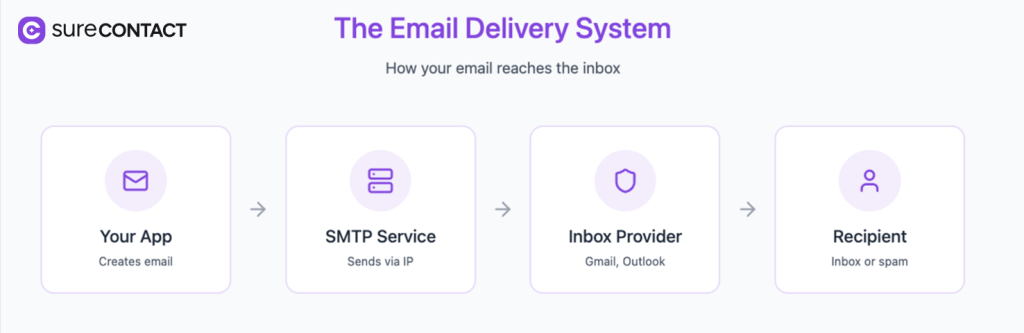
Every email passes through three main layers. Each layer plays a different role and controls a different part of the outcome.
Prefer to watch rather than read?
1.1 Your email app or tool
This is where the email is created.
Examples:
- A website sending notifications
- A CRM sending newsletters
- An online store sending order receipts
Your app decides:
- Who receives the email
- What the email says
- When it is sent
- How users are grouped and targeted
Most people think email problems come from their tool. In reality, your tool controls only part of what happens.
Even the best tool cannot force Gmail or Outlook to show your email in the inbox.
1.2 The sending service (SMTP)
Your app doesn’t send emails directly to Gmail or Outlook. Instead, it uses a sending service called SMTP (Simple Mail Transfer Protocol).
Think of SMTP as the delivery company that carries your email from your app to the recipient’s inbox provider.
Examples of SMTP services:
- Amazon SES
- SendGrid
- Mailgun
- Postmark
- SMTP2Go
Simple analogy to explain SMTP: If your app writes the letter, SMTP is the courier that delivers it.
But the courier is not neutral. Inbox providers observe how reliable this courier is over time.
1.3 Inbox providers
Inbox providers include Gmail, Outlook and Yahoo.
They decide what happens to your email:
- Goes to inbox
- Goes to promotions
- Goes to spam
- Gets blocked
Your tool doesn’t decide where your email lands, inbox providers do. That’s why switching tools often doesn’t fix deliverability issues.
Inbox providers are not evaluating your tool. They are evaluating your identity, behavior, and infrastructure.
1.4 How all in one platforms like Mailchimp work
Tools like Mailchimp, HubSpot and Klaviyo combine everything into one system.
They provide:
- Email editor and automation
- Contact lists and segmentation
- Built in sending infrastructure
- Guidance for setup and monitoring
From the outside, it feels simple, write an email, click send. Behind the scenes, the same flow still exists:
Your app → sending service → inbox provider → user
The difference is that these platforms control both the tool and the sending service.
Why these platforms feel easier
All in one platforms are designed to reduce risk and complexity.
They:
- Hide technical details
- Protect shared sending systems
- Limit risky sending behavior
- Automatically slow down suspicious activity
- Enforce strict rules to protect their reputation
This makes them great for beginners and small teams.
The tradeoff
When you use an all in one platform:
- Platform level changes can affect your deliverability
- You don’t fully own your sending reputation
- All in one platforms charge a premium
That’s why, as teams grow, some choose to separate their tool from their sending service to gain more control, flexibility and long term reliability.
2. What Happens When You Send an Email
Every email follows the same journey.
Understanding this journey explains why deliverability depends on multiple factors, not just content.
2.1 Your app creates the email
Your tool prepares the message:
- Text and subject line
- Recipients
- Timing
Even if this is perfect, deliverability can still fail later.
This is why great copy doesn’t guarantee inbox placement.
2.2 The sending server IP address
Every sending server has an IP address. It’s the network address of the server that sends your email.
When Gmail evaluates your email, it looks at two identities:
- Your domain (your brand identity)
- The IP address (where the email came from)
If your domain is your brand name, your IP address is your delivery warehouse. Inbox providers build trust for both.
Important reality:
- A trusted brand with a bad sending server can still land in spam
- A good sending server with an untrusted brand can also land in spam
How trust for an IP is earned
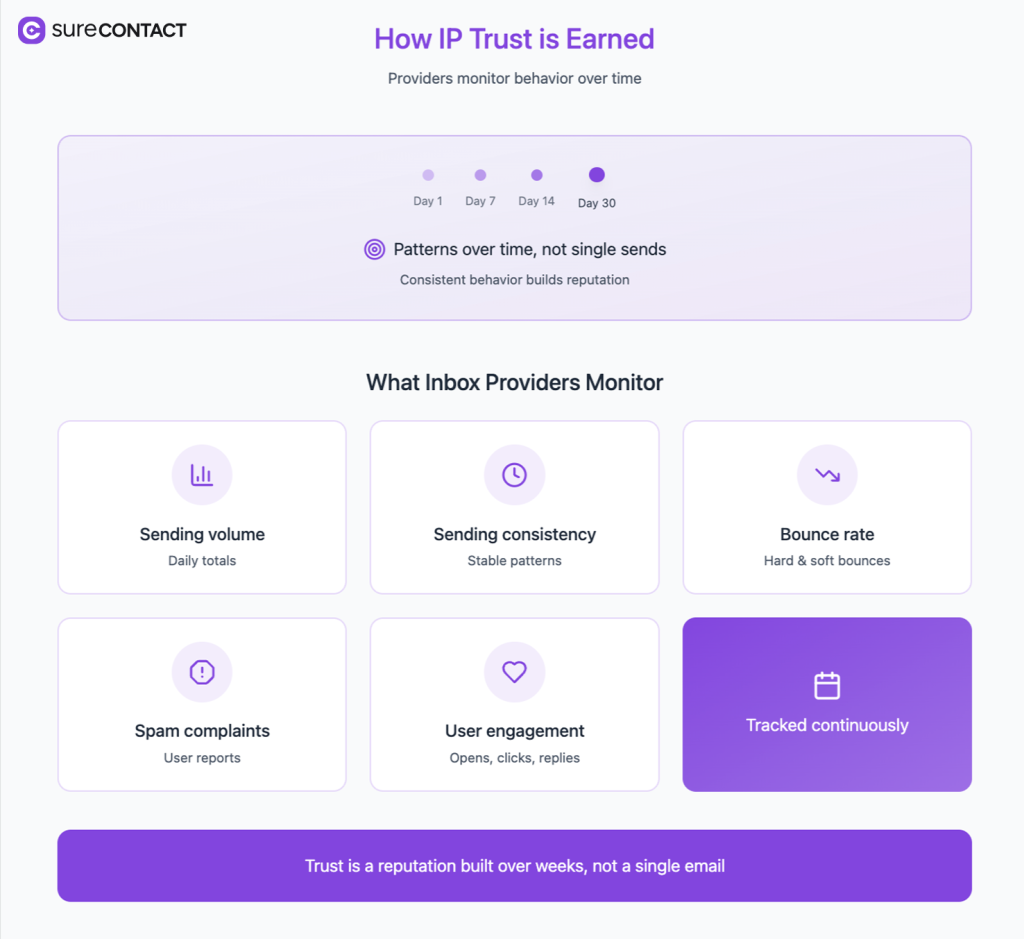
Inbox providers watch how a sending server behaves over time:
- How many emails it sends
- How consistent the sending is
- How many emails bounce
- How many people mark emails as spam
- How people engage with emails
They aren’t just looking at numbers. They’re looking for patterns.
For example:
- Gradual growth in sending volume looks natural
- Sudden spikes look suspicious
- Stable engagement builds trust
- Sudden drops in engagement raise red flags
If a server suddenly sends huge volumes or spam emails, trust drops quickly. Recovery is slow and difficult.
Shared IP vs dedicated IP
Shared IP means many senders use the same server.
- Easier to start
- Reputation influenced by other senders
- Often safer for low volume senders
Dedicated IP means only you use the server.
- More control
- Full responsibility for reputation
- Requires careful gradual sending
A dedicated IP isn’t always better. If you send low quality mails from a dedicated IP, it can perform worse than a well managed shared IP.
What sending services actually do
Sending services do more than deliver emails, they:
- Sign emails to prove authenticity
- Manage queues and retries
- Adjust sending speed based on feedback from inbox providers
- Track bounces and complaints
- Protect server reputation
Your sending service is part of your reputation, not just a technical tool.
2.3 How inbox providers judge emails
Inbox providers do not judge emails one by one. They judge patterns.
They look at:
- Your past behavior
- Your sending server history
- How recipients react to your emails
They also compare your current behavior with your past behavior.
For example:
- If you normally send 1,000 emails per day and suddenly send 100,000, that looks risky
- If your emails normally get clicks and suddenly get none, that looks suspicious
Based on these signals, they decide whether your email deserves the inbox.
Inbox placement is not guaranteed. It is earned through consistent, trustworthy behavior.
3. The Four Questions Inbox Providers Ask
When an email arrives, inbox providers silently ask four questions that form the mental model of how deliverability works.
3.1 Are you really who you claim to be?
Inbox providers check whether your domain is allowed to send emails.
This is done using technical records like SPF, DKIM and DMARC.
These records tell inbox providers: “Yes, this server is allowed to send emails for this domain.”
Without these records, inbox providers cannot verify your identity. This makes your emails look similar to impersonation or phishing attempts.
Passing these checks proves identity but not trust.
3.2 Have you behaved well over time?
Inbox providers look at your past behavior:
- Do people open and click your emails?
- Do people complain or unsubscribe?
- Do you suddenly change volume or frequency?
Behavior matters more than configuration.
Even perfectly configured systems can lose deliverability if behavior becomes unpredictable.
3.3 Is your sending system reliable?
Inbox providers also evaluate how your sending system behaves:
- Is sending stable or chaotic?
- Are there many errors or bounces?
- Does volume change suddenly?
They also observe how your sending service responds to failures.
For example:
- Does it retry intelligently?
- Does it throttle when inbox providers slow down?
Choosing a sending service is not just a cost decision. It affects trust.
3.4 Does your email match what people expect?
Inbox providers compare:
- What users signed up for
- What you actually send
- How often you send
This is where many legitimate businesses fail.
If users sign up for product updates but start receiving aggressive promotions, inbox providers can detect it.
Expectation mismatch is one of the most underestimated causes of poor deliverability.
4. Why Deliverability Breaks
Deliverability rarely breaks for one reason alone. It’s usually the result of small issues across domains, tools, lists, and sending behavior.
That’s why we recommend running a full email deliverability audit checklist before making changes, so you can see what actually changed instead of guessing.
Most problems fall into three categories:
- Identity problems: Wrong or missing setup
- Behavior problems: Low quality lists, sudden spikes, low engagement
- System problems: Unstable sending infrastructure
A simple way to think about it:
- Did something change in how you send?
- Did something change in who you send to?
- Did something change in your sending system?
Real world examples:
- A company imports an old email list and suddenly sees spam placement
- A product launches a big campaign and sends 10x more emails than usual
- A team switches SMTP providers without warming up
Most teams try to fix deliverability by switching tools instead of understanding what actually changed.
5. How to Design a Reliable Email System
Deliverability isn’t fixed with one setting. It’s designed like a system.
5.1 Separate critical and marketing emails
Use your main domain for critical emails like login and receipts and use a separate subdomain for marketing emails.
Example of transactional emails:
- [email protected] → transactional emails
- [email protected] → receipts and invoices
Example of marketing emails:
- [email protected] → marketing campaigns
- [email protected] → newsletters
If both types of emails use the same domain reputation:
- Spam complaints from marketing emails affect transactional emails
- Password resets and login links start landing in spam
- Users stop receiving critical system emails
By separating domains, you create a safety boundary.
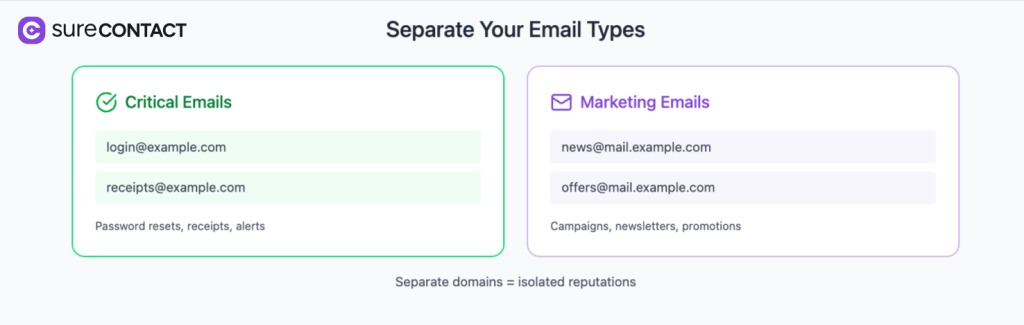
Marketing emails can take risks. Critical system emails should not.
Think of domains as trust boundaries. Experiments should never put essential communication at risk.
5.2 Make sure your email tools are authorized and correctly configured
Most email deliverability issues happen because email tools aren’t properly authorized at the domain level.
Every tool that sends emails from your domain must be approved in your DNS settings.
If your domain says “only Amazon SES can send emails”, but SendGrid or Gmail also sends emails, inbox providers see a mismatch.
That reduces trust and pushes emails to spam.
How email authorization actually works
When an email is sent, Gmail or Outlook checks:
- Which server sent the email
- Whether your domain allows that server (via SPF)
- Whether the email is signed correctly (via DKIM)
- Whether your domain has rules for handling failures (via DMARC)
If any of these don’t match, your emails look suspicious.
Real world example of a typical setup
Imagine your domain is: example.com
And you use multiple tools:
- Website emails → Amazon SES
- CRM campaigns → SendGrid
- Support replies → Gmail
- Newsletters → Mailchimp
If they all send emails from @example.com, then:
- Amazon SES must be added to SPF and DKIM
- SendGrid must be added to SPF and DKIM
- Gmail must be added to SPF and DKIM
- Mailchimp must be added to SPF and DKIM
If even one tool is missing, deliverability drops.
5.3 Use transactional emails to build trust
Transactional emails are messages triggered by real user actions.
Examples:
- Account creation confirmations
- Password resets
- Order confirmations
- Payment receipts
- Booking notifications
- Security alerts
They usually get high opens and clicks because users actively expect them.
Inbox providers observe how recipients interact with your emails.
When many users open and engage with transactional emails, inbox providers learn:
- These emails are wanted
- This sender has real users
- This domain is not random spam
Over time, this positive behavior strengthens your overall reputation.
5.4 Increase sending gradually
When you start sending emails from a new domain, a new IP, or a new provider, inbox providers don’t fully trust you yet so they treat you like an unknown sender.
Gradual sending helps you build trust step by step. Inbox providers prefer predictable behavior over sudden spikes.
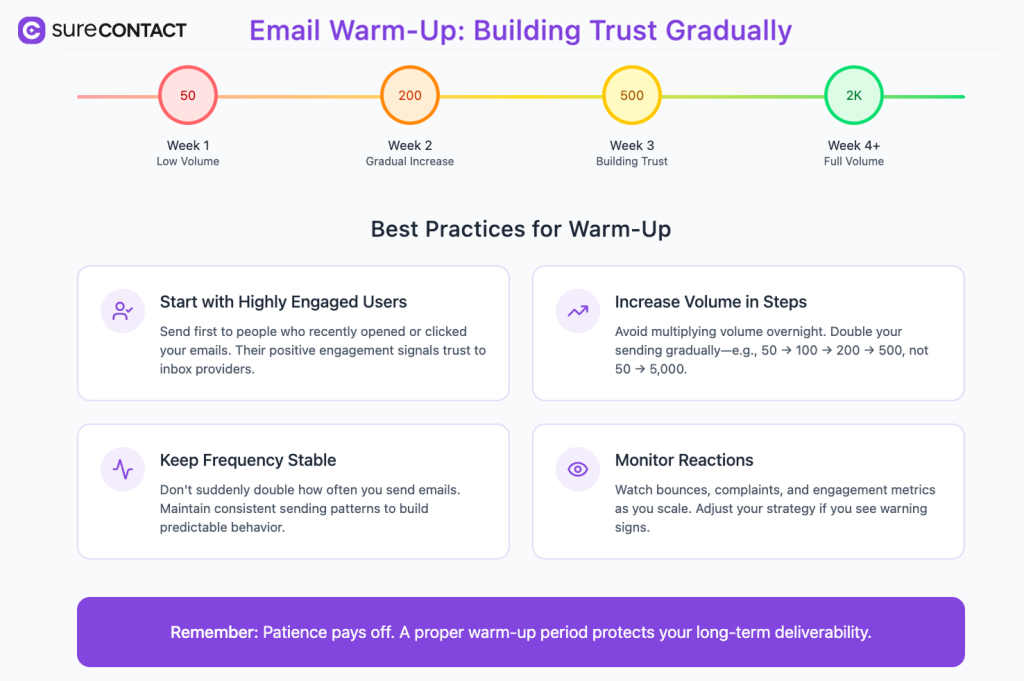
Some tips:
- Start with highly engaged users: Send first to people who recently opened or clicked your emails.
- Increase volume in steps: Avoid multiplying volume overnight.
- Keep frequency stable: Don’t suddenly double how often you send emails.
- Monitor reactions: Watch bounces, complaints and engagement as you scale.
5.5 Treat your email list like an asset
Most teams treat their email list like a database. Inbox providers treat it like a signal of quality.
Your list directly affects your reputation.
If many recipients:
- Ignore your emails
- Never open them
- Mark them as spam
- Bounce because addresses are invalid
Your reputation declines, even if you never send spam.
- Regularly clean your list: Remove invalid addresses.
- Segment inactive users: Reduce frequency instead of blasting campaigns.
- Respect unsubscribes immediately: Ignored unsubscribes increase complaints.
- Prioritize engagement over volume: A smaller engaged list is more valuable than a large inactive list.
5.6 Align content with expectations
Deliverability is not only about technology, it’s also about psychology. Inbox providers try to understand whether your emails match what users expect.
Expectations are created when users:
- Sign up on your website
- Download a resource
- Create an account
- Make a purchase
At that moment, users form an implicit agreement about what kind of emails they are willing to receive.
Example:
- User signs up for product updates
- Suddenly receives daily promotional emails
From the user’s perspective, this feels unexpected. From the inbox provider’s perspective, this looks like low quality sending behavior.
- Be explicit about what users will receive: Tell users what type of emails they are signing up for.
- Keep frequency consistent: Avoid sudden changes in how often you send emails.
- Separate different types of emails: Use different lists or subdomains for different purposes.
- Match subject lines with content: Misleading subject lines damage trust quickly.
Inbox providers measure the gap between user intent and your content. The larger the gap, the lower your deliverability.
Trust is built when expectations and reality align.
6. Metrics that actually matter
Many teams track email volume and open rates, but these don’t reflect real deliverability or trust.
Inbox providers care more about how people react to your emails than how many you send.
Below are some key trust metrics:
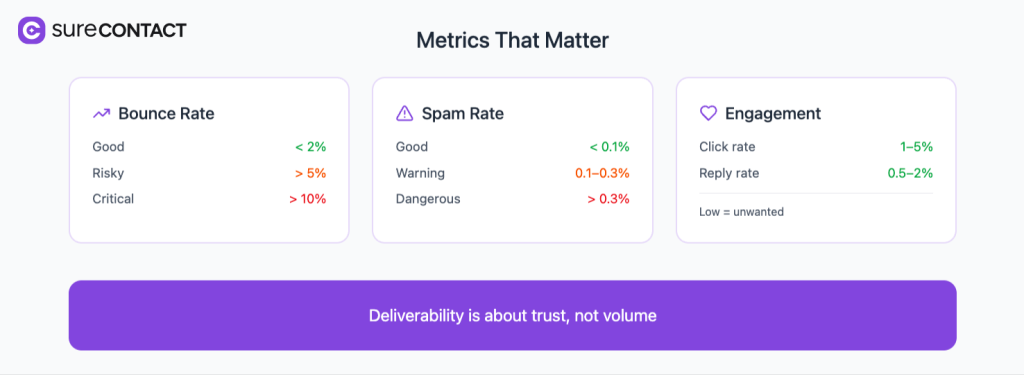
1) Bounce rate
Measures how many emails fail to reach inboxes.
Benchmarks:
- Good: < 2%
- Risky: > 5%
- Critical: > 10%
High bounce rates signal poor list quality or misconfigured domains.
2) Spam complaint rate
Measures how often recipients mark your emails as spam.
Benchmarks:
- Good: < 0.1%
- Warning: 0.1% to 0.3%
- Dangerous: > 0.3%
Even a small increase can damage domain reputation.
3) Engagement signals
Inbox providers track whether people interact with your emails in terms of clicks and replies.
Benchmarks:
- Healthy click rate: 1% to 5%
- Reply rate for B2B emails: 0.5% to 2%
Low engagement tells Gmail and Outlook that your emails are unwanted.
A campaign sent to 100,000 users with 70 clicks and high spam complaints is not successful, it’s a warning.
Deliverability is not about volume. It is about trust.
Deliverability as Long Term Trust
Deliverability grows like reputation. Consistent, relevant emails slowly build trust.
Irrelevant or aggressive emails destroy trust quickly.
When you understand this, deliverability stops feeling mysterious and starts feeling predictable.