At some point, most WordPress site owners end up in the same spot. Leads are coming in through a contact form. Orders are in WooCommerce. There’s a newsletter list somewhere else and an inbox full of individual email replies. Everything lives in a different place. Nothing connects. And the question becomes: can WordPress just handle this?
The honest answer is no. WordPress is a content management system. It’s built to publish and organize content, not to manage customer relationships. But knowing that is useful. It points you directly to what to look for.
The quick answer: WordPress doesn’t include CRM features by default. There’s no built-in contact database, no email automation, no deal tracking, and no segmentation. You can add CRM capabilities through a plugin that lives inside WordPress, or by connecting a cloud-based CRM like SureContact to your site. Which path fits depends on your list size and how active your email program is.
Does WordPress Have a Built-In CRM?
No. WordPress ships with a content editor, a post database, and a plugin system. That’s it.
What often gets mistaken for CRM functionality is WordPress’s ability to collect data. A contact form captures names and email addresses. WooCommerce records customer orders. A membership plugin tracks who’s signed up. That’s data collection. A CRM is what happens with that data over time: the follow-ups, the segments, the automations, the full relationship history in one place.
WordPress powers 42.5% of all websites globally as of April 2026, according to W3Techs. The CRM layer has to come from somewhere else.
What Does a CRM Actually Do That WordPress Doesn’t?
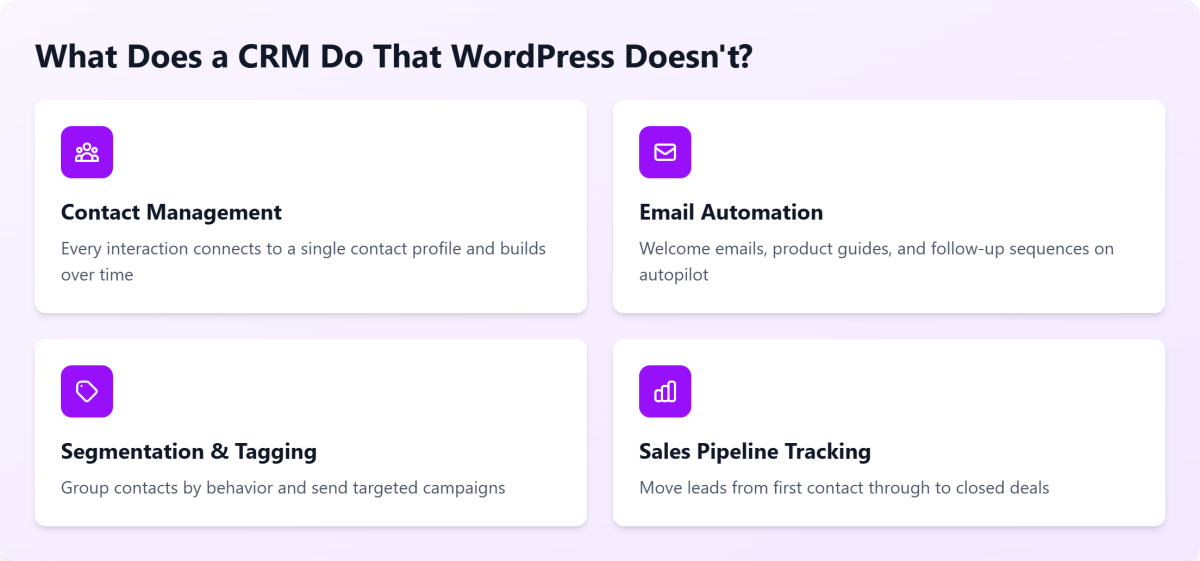
A CRM is organized around the customer record. Every interaction (emails opened, pages visited, purchases made, form fills, support requests) connects to a single contact profile and builds over time.
Contact management beyond form entries. WordPress stores form submissions in a database table. That’s not a contact record. A real CRM shows you every touchpoint for a given contact across their entire history with your business, which is what makes meaningful follow-up actually possible.
Email automation and sequences. Want a welcome email to go out when someone signs up, followed by a product guide three days later, then a check-in email two weeks after that? WordPress has no native automation layer. Most site owners need to add this layer early.
Segmentation and tagging. Knowing who bought, who hasn’t opened an email in 60 days, and who clicked a specific link, and being able to email each group differently, is standard in any CRM. WordPress has no concept of contact segments.
Sales pipeline tracking. If you’re moving leads from first contact through to a closed deal, that’s a sales pipeline. WordPress has posts, pages, and products. It has no pipeline.
You don’t need all four from day one. But once you want to do more with your contacts than send a form confirmation, you need a dedicated tool.
Can You Use a WordPress Plugin as a CRM?
Yes, and for many site owners this is exactly the right starting point.
Plugins like FluentCRM, Jetpack CRM, and Groundhogg install directly inside WordPress. They add a contact database, email automation, tagging, and basic segmentation right from your existing dashboard. You don’t need to learn a new platform, and the pricing is usually flat or one-time.
One thing worth knowing before your list grows: Native CRM plugins store all your contact data in your WordPress database. Every contact record, activity log, and email event runs on your server.
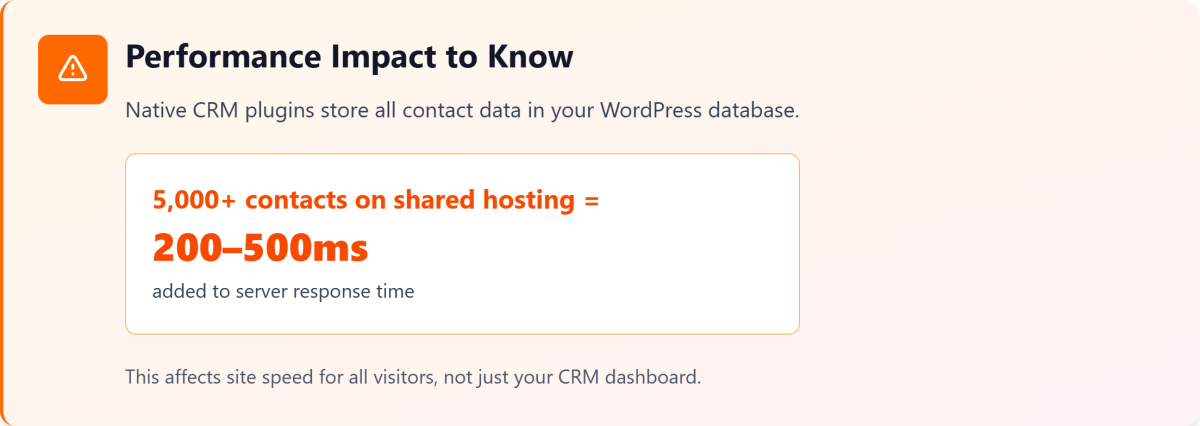
With a smaller list, that’s fine. Once you’re managing 5,000 or more contacts on shared hosting, the database queries behind an active CRM can add 200–500ms to your server response time, according to testing from multiple hosting benchmarks. That number climbs as your automations get more active, and it affects your site speed for regular visitors, not just the CRM dashboard.
Plugin CRMs are a solid starting point. That ceiling is real, and it’s worth knowing where it sits before you build your whole contact system on top of it. For a full comparison of the top options, including how each performs on list size, WooCommerce integration, and email automation depth, see the guide to the best WordPress CRM plugins.
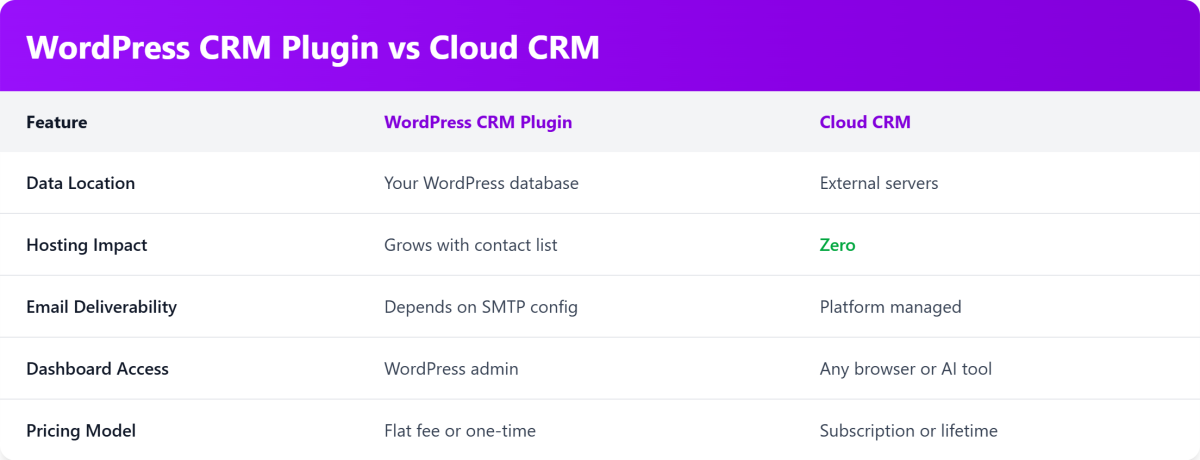
What’s the Difference Between a WordPress CRM Plugin and a Cloud CRM?
The core difference is where your data lives and what carries the processing load.
A cloud CRM connects to your WordPress site but processes everything externally. Your WordPress database stays lean. Your server handles content. The cloud CRM handles contacts.
SureContact is a WordPress-native CRM and email marketing platform. It connects directly to your WordPress site and WooCommerce while handling all contact data, automations, and email sending outside your server, so your hosting stays unaffected regardless of list size. Form submissions, contact records, and order history sync automatically.
Deliverability is also handled differently. With SureContact, you can send from your own domain with full authentication (SPF, DKIM, DMARC) configured through the platform. Every email comes from your actual brand address rather than a shared IP. For anyone running regular campaigns to a list of thousands, that distinction matters for where emails land.
For teams that work inside Claude or ChatGPT, SureContact’s MCP connection lets you manage your contact database, check automation status, and run campaigns directly from your AI tool, without opening a dashboard.
Does WordPress Have Email Marketing Built In?
No. Email marketing isn’t part of the WordPress core.
What WordPress does well is act as the collection point. Forms capture leads. WooCommerce records every purchase. Membership plugins track subscribers. All of that data sits in your database waiting to be useful.
An email marketing tool is what makes it useful. SureContact pulls your WooCommerce order history, your contact tags, and your form submissions into a single contact record. From there, you can segment past buyers from first-time visitors, set up a post-purchase sequence, or send a re-engagement campaign to contacts who haven’t opened anything in three months.
The data was always there. The email tool is what gives it somewhere to go. For a deeper look at how the two fit together, including which tools work natively with WordPress and how to set up your first campaign, the WordPress email marketing guide covers the full picture.
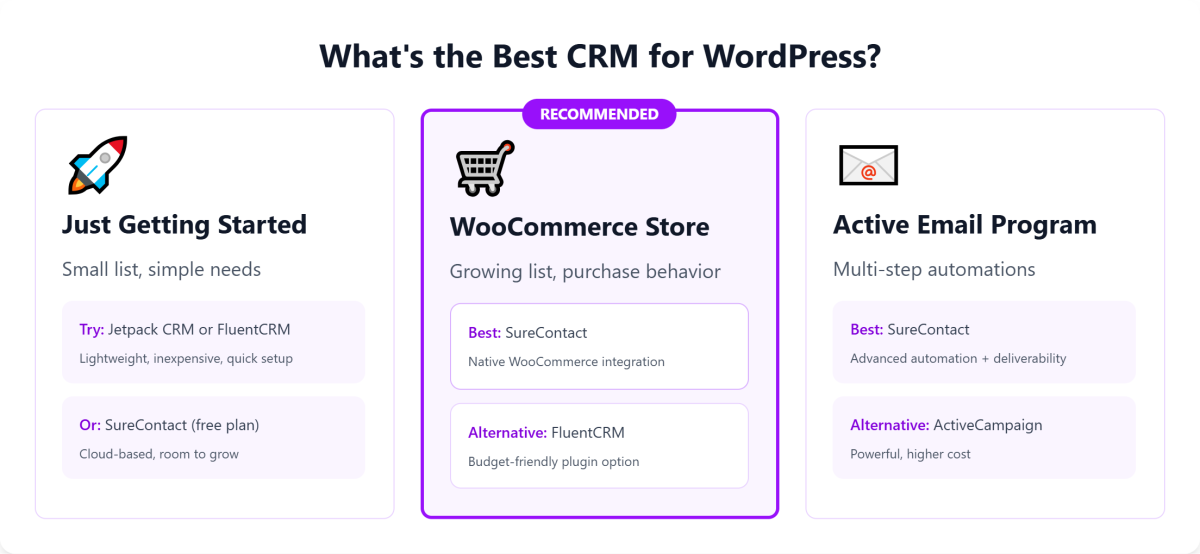
What’s the Best CRM for a WordPress Site?
No universal answer here, but your situation gives you a clear signal.
If you’re just getting started and have a small list, a lightweight plugin is a reasonable first step. Jetpack CRM and FluentCRM are both well-maintained, inexpensive, and take minutes to set up inside WordPress. See the best WordPress CRM plugins comparison for a side-by-side breakdown of the top options.
If you run a WooCommerce store and want to build automations tied to purchase behavior, run segmented campaigns to a growing list, and avoid the performance tradeoff of a database-heavy plugin, a cloud CRM that integrates natively with WordPress is the more practical choice.
If you’re running a service business, a course platform, or a content site with an active email program, the question is how much automation you actually need. One newsletter per month is a different job than a multi-step onboarding sequence with conditional logic.
SureContact is built for the WordPress and WooCommerce use case. It integrates directly with your site, keeps your server clear of CRM data, handles deliverability at the platform level, and supports direct migration from Mailchimp, ActiveCampaign, Brevo, Kit, MailerLite, and Drip. If you’re already on another platform and want to switch, you don’t have to start over.
How Do You Get Started?
Starting fresh: Install the SureContact WordPress plugin, connect it to your site, and your contact forms and WooCommerce orders start syncing immediately. Set up your sending domain, build your first automation, and send your first campaign. The full setup guide is at surecontact.com/docs/.
Migrating from another tool: SureContact’s import flow handles the transfer from most major platforms. Your contacts, tags, and segments come with you. The migration from Mailchimp, ActiveCampaign, Brevo, Kit, MailerLite, and Drip is supported directly through the platform.
Moving off a plugin CRM: The signs that it’s time to move are usually clear: slow dashboard loads with a larger list, deliverability limits with your current SMTP setup, or automations that feel limited compared to what you actually need. Connect SureContact at surecontact.com/integrations, import your contact list, and rebuild your automations in the new environment.
WordPress isn’t a CRM. But connected to the right tool, it becomes the front end of a complete email and contact management setup, without changing your hosting, moving your site, or learning an entirely new platform from scratch.
Frequently Asked Questions
Does WordPress have a built-in CRM? No. WordPress is a content management system and doesn’t include CRM features by default. CRM functionality comes from plugins or cloud-based tools that connect to your WordPress site.
What is the difference between WordPress and a CRM? WordPress manages and publishes content. A CRM manages customer relationships over time: contact records, email automation, segmentation, and sales pipelines. They serve different purposes and are often used together.
Can you use WordPress as a CRM? Not on its own. You can add CRM capabilities through plugins like FluentCRM or Jetpack CRM, or connect a cloud-based CRM like SureContact that integrates natively with WordPress and WooCommerce.
What is the best CRM for a WordPress site? SureContact is the strongest fit for WordPress and WooCommerce site owners who need email marketing, contact management, and automation in one place, without adding database load to their server. For smaller lists just getting started, lightweight plugins like FluentCRM or Jetpack CRM are a reasonable entry point.
Is there a free CRM for WordPress? Yes. Jetpack CRM and Groundhogg both have free tiers. SureContact offers a free plan to get started, with paid options as your contact list and sending volume grow.
Does WordPress have email marketing? Not natively. Email marketing requires a separate tool. SureContact, FluentCRM, and Mailchimp all offer native WordPress integrations that connect your site data to your email campaigns.