
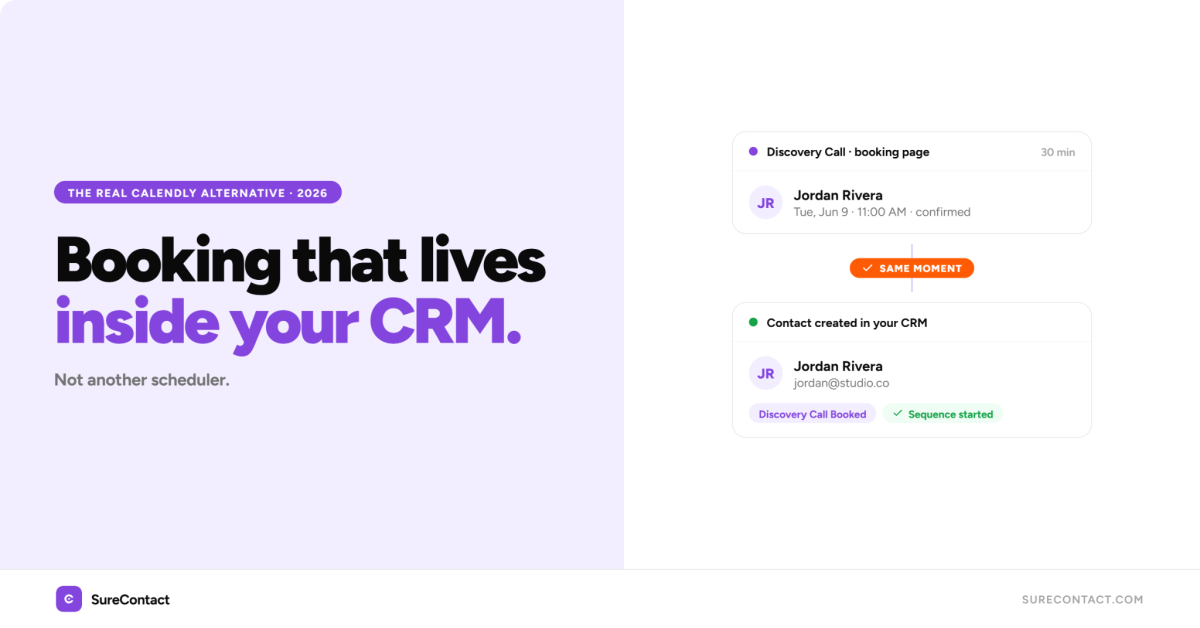
Every booking you take in Calendly lives in a place far away from your CRM and email. The person scheduled the call, got their invite, and confirmed the time, but they are not in your CRM. They are not in your email sequence. Whatever follow-up you had planned happens manually, from a different tool. That is the real frustration with Calendly, and most alternatives do not fix it. They replace the scheduling interface. They leave the gap exactly where it was.
This guide covers the best Calendly alternatives for 2026, including the standalone schedulers worth knowing. It also makes a case the other comparison articles miss: if you run a WordPress business and use email marketing, the best alternative is not another scheduling tool. It is booking that lives inside your CRM.
The short answer: The best Calendly alternative for freelancers, consultants, and small businesses on WordPress is SureContact. It includes a native booking system, and every booking automatically creates a CRM contact and triggers your automations, with no Zapier and no pipeline to maintain. Pricing starts at $12.50/month and includes email campaigns, sequences, landing pages, and forms in the same plan. For pure scheduling without a CRM, Cal.com (free, open source) and TidyCal (one-time payment) are the strongest standalone picks.
Why Do People Look for a Calendly Alternative?
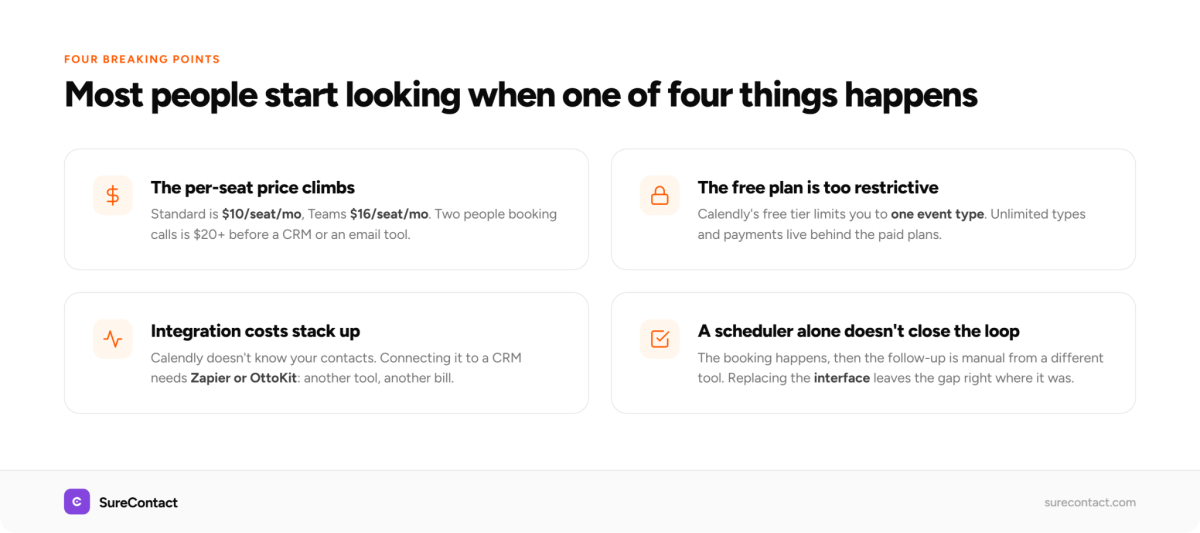
Most people start looking when one of four things happens: the price per seat climbs as the team grows, the free plan becomes too restrictive, integration costs start stacking, or they realise a booking tool alone does not solve the full problem.
Calendly’s free plan limits you to one event type. The Standard plan at $10 per seat per month adds unlimited event types, Stripe and PayPal payments, and Zapier access. The Teams plan at $16 per seat per month adds round-robin scheduling and Salesforce routing. For a solo consultant those numbers are manageable. For anyone who also pays for a CRM and an email tool, the total climbs fast.
The integration issue is the one that gets talked about least. Calendly does not know about your contacts. When someone books a meeting, Calendly creates a record, but your CRM and email marketing tool do not. To connect them you need an automation platform like OttoKit or Zapier, and that is before you have configured a single reminder or follow-up.
What Are the Best Standalone Calendly Alternatives?
If all you need is scheduling, several tools do it well. Here is an honest look at the strongest standalone options.
SureContact is the best Calendly alternative for freelancers, consultants, and small businesses on WordPress as it includes a native booking system, and every booking automatically creates a CRM contact and triggers your automations without any extra setup.
Cal.com is open source and free for most use cases, with paid plans for teams. It removes per-seat costs and gives developers full control. It is the best pick if you want flexibility and own your data, though it asks more of you during setup.
Zencal focuses on branded booking pages and includes a review-collection feature that displays attendee ratings on your page. A good fit if booking-page polish and social proof matter to you.
Acuity Scheduling is built for service businesses that need clients to book and pay in one flow, with packages, memberships, and intake forms. Strong for salons, clinics, and coaches.
TidyCal is the value pick, with a one-time payment of around $29 for unlimited bookings. If subscription fatigue is your reason for leaving Calendly, this is the simplest exit.
SavvyCal solves booking from the recipient’s side, letting invitees overlay their own calendar on yours. Better for high-volume external scheduling where the booking experience matters.
Each of these replaces Calendly’s scheduling. None of them changes what happens to the contact after they book. That is the part the next section is about.
Why Should Your Booking Tool and Your CRM Be the Same Thing?
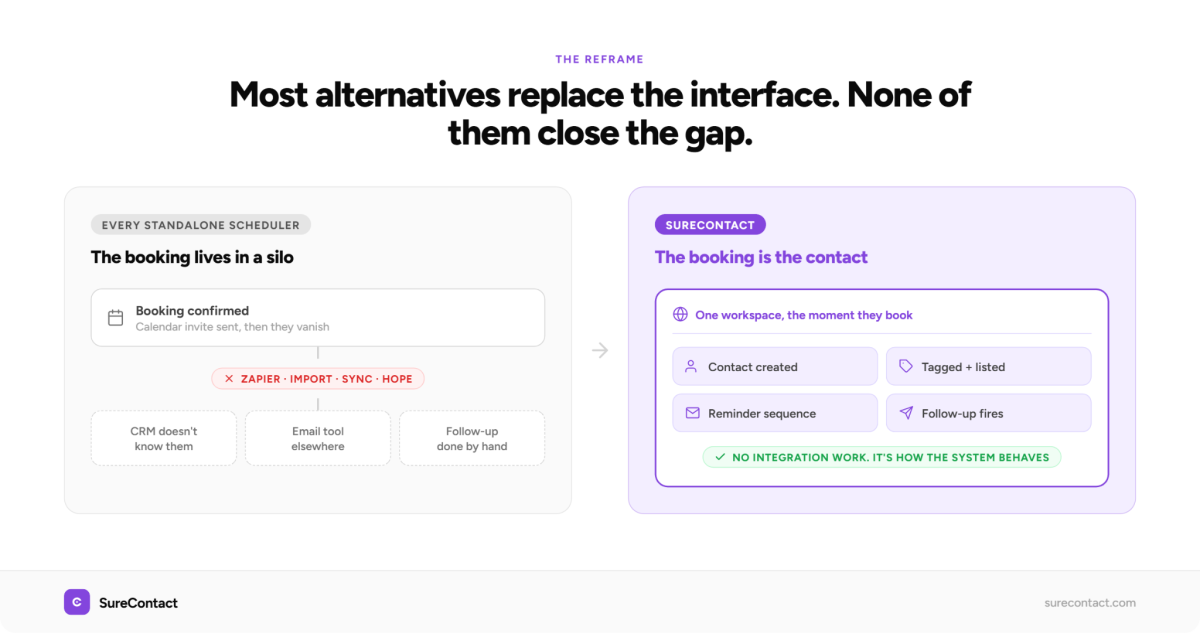
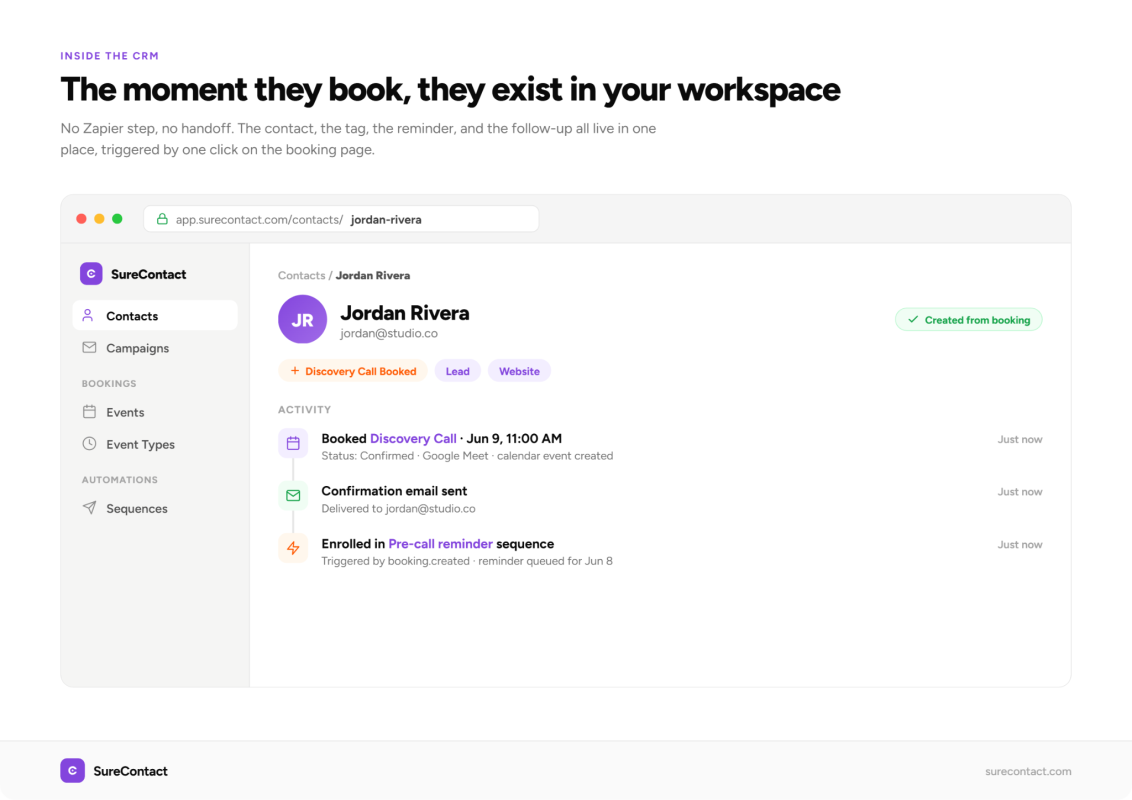
When booking lives inside your CRM, the contact exists the moment the booking is made. No Zapier step, no handoff, no gap where someone falls through.
That changes what is possible before and after the call. A pre-call reminder sequence fires automatically. A post-call follow-up starts the next day. If someone reschedules, the sequence pauses and restarts. If they do not show, a re-engagement triggers. None of that requires integration work. It is simply how the system behaves.
This is what SureContact’s booking system does. It launched in early June 2026 as part of the core platform. When someone books through SureContact, they are added as a contact in your workspace immediately, and any automation you have set up fires without additional configuration.
If you book discovery calls as part of a larger relationship workflow, the whole sequence from first touch to signed client can live in one place. The person fills out a landing page form, books a call, gets a reminder sequence, and receives a follow-up proposal email, all built in SureContact. No tool-switching and no integrations to maintain.
How Does SureContact’s Booking System Work?
SureContact lets you create event types for Online Meetings, Phone Calls, and In-Person Meetings. You set the duration, anywhere from 15 to 120 minutes, configure your availability, and share a booking URL.
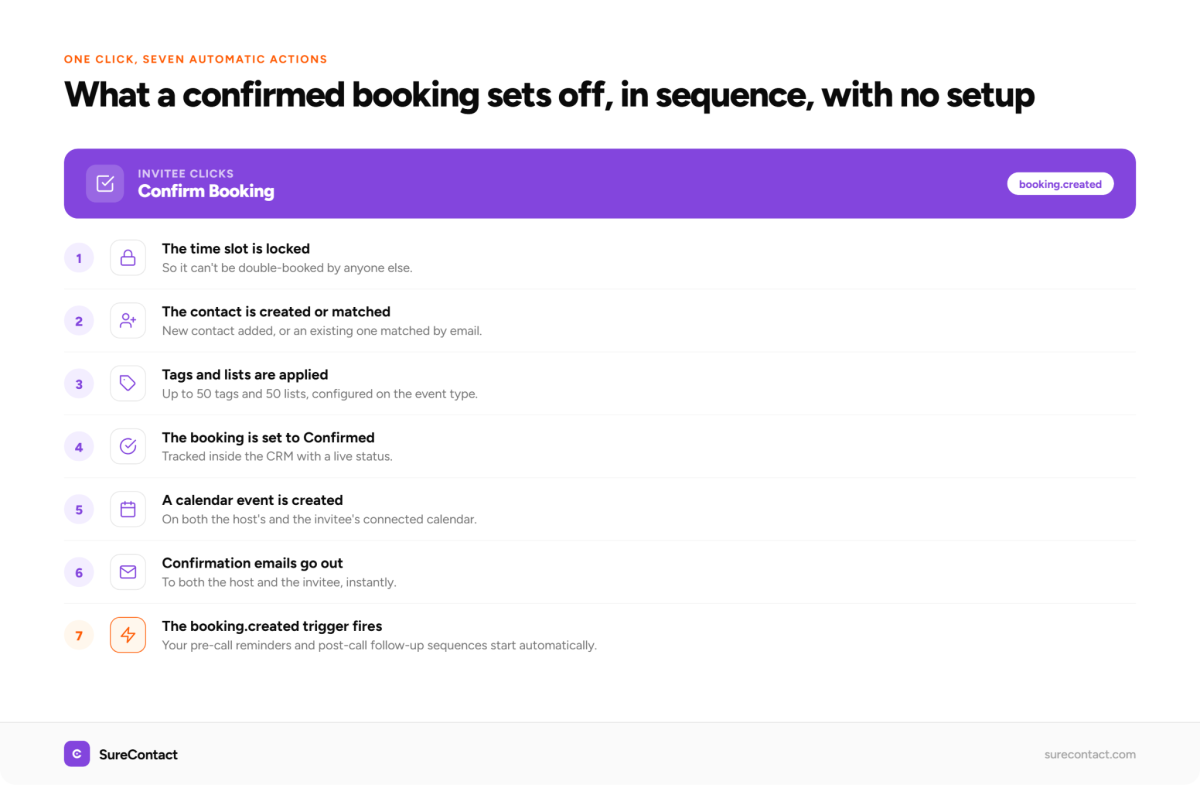
When someone books, the event is tracked inside SureContact, the contact is created or matched if they already exist, and invitees can reschedule or cancel using the same link. Booking status updates in the CRM automatically. The full flow is covered in the SureContact booking guide.
Because the booking is inside your CRM, you can build automations that trigger on it directly. Tag the contact as “Discovery Call Booked”, start a pre-call reminder, and queue a post-call follow-up. Everything is available immediately, in the same tool, with no external connections.
What Does This Look Like in Practice?
Take a freelance web designer who books discovery calls before quoting a project. Someone finds her through a blog post, reads a couple more pages, and clicks “Book a call”.
With a standalone scheduler, that click opens Calendly. The person picks a slot, gets a calendar invite, and disappears from view until the call. Her CRM has no idea this person exists. If she wants them in a nurture sequence, she adds them by hand or hopes a Zap caught it.
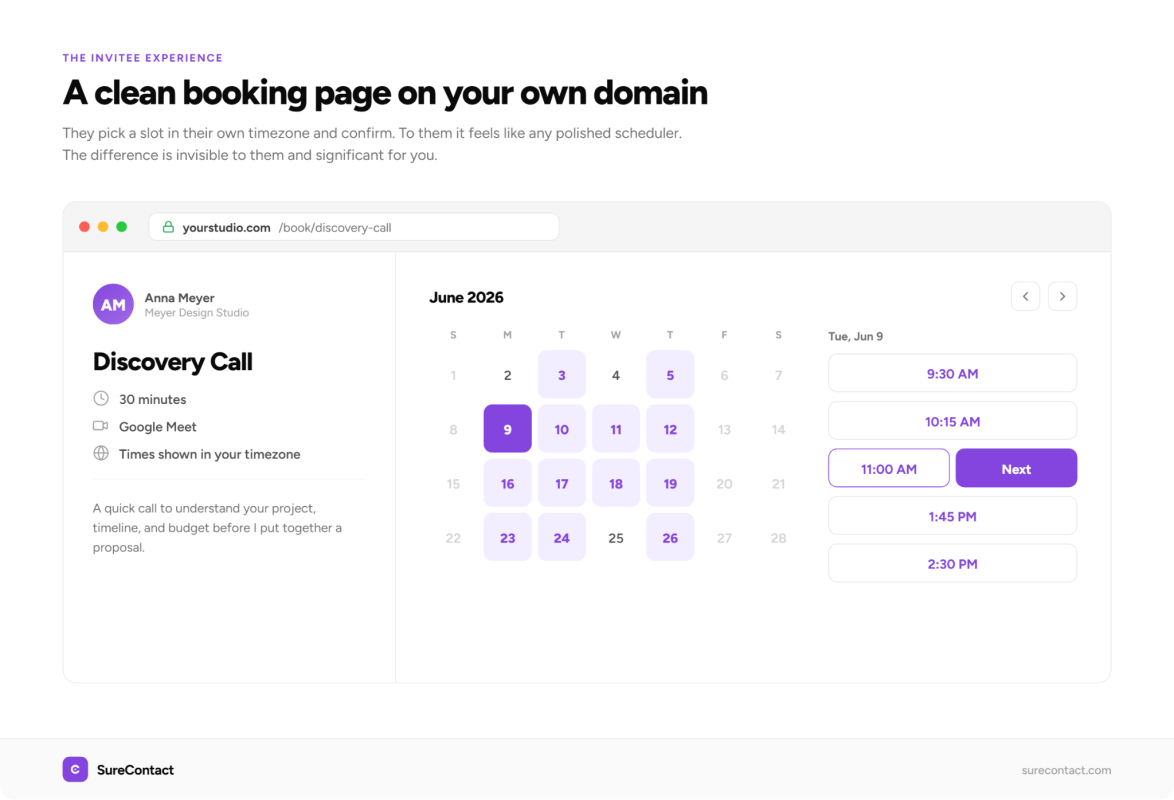
With SureContact, the same click opens a booking page on her own domain. The person picks a slot and confirms. The moment they do, they exist as a contact in her workspace, tagged “Discovery Call”. A confirmation goes out straight away. The day before, a reminder lands with the call link and a short note asking what they want to cover, which quietly cuts her no-show rate without her doing anything.
After the call, she tags the contact “Proposal Sent”. That tag starts a three-email follow-up: the proposal on day one, a check-in on day four, a final nudge on day seven. If they sign, she stops the sequence. If they go quiet, the sequence does the chasing she would otherwise forget to do.
None of this is a separate tool. The booking, the contact, the reminder, and the follow-up all happen in one place, triggered by one click on her booking page.
What the Person Booking Sees
The invitee’s experience is the part that matters most, because a clumsy booking page costs you the meeting before it is booked.
They land on a clean page on your domain, not a third-party link that looks nothing like your brand. They see your open slots in their own timezone, pick one, and enter their details. They get an instant confirmation and a calendar invite, and if something changes, the same link lets them reschedule or cancel without emailing you. To them it feels like booking through any polished scheduling tool. The difference is invisible to them and significant for you, because they are now a contact in your CRM rather than a record stranded in a separate app.
Calendly vs SureContact vs Standalone Schedulers
| Feature | Calendly (Standard) | Cal.com | TidyCal | SureContact (Starter) |
|---|---|---|---|---|
| Booking pages | Yes | Yes | Yes | Yes |
| Multiple event types | Yes | Yes | Yes | Yes |
| Reschedule / cancel | Yes | Yes | Yes | Yes |
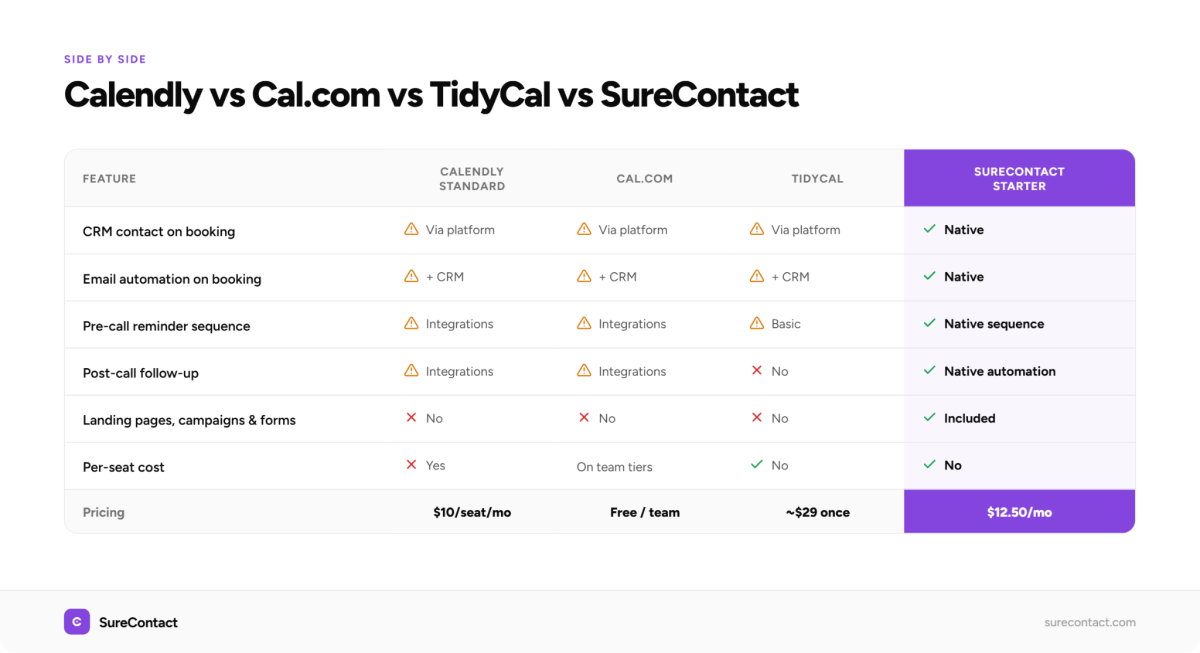
| CRM contact on booking | Via automation platform | Via automation platform | Via automation platform | Native |
| Email automation on booking | Via platform + CRM | Via platform + CRM | Via platform + CRM | Native |
| Pre-call reminder sequence | Via integrations | Via integrations | Basic | Native sequence |
| Post-call follow-up | Via integrations | Via integrations | No | Native automation |
| Landing pages | No | No | No | Yes |
| Email campaigns | No | No | No | Yes |
| Forms | No | No | No | Yes |
| Pricing | $10/seat/mo | Free / team plans | ~$29 one-time | $12.50/mo (up to 10K contacts) |
| Per-seat cost | Yes | On team tiers | No | No |
The pricing comparison is worth unpacking. Calendly Standard is $10 per seat per month, so two people booking calls is $20/month before a CRM and an email tool. SureContact at $12.50/month includes the booking system, email campaigns, sequences, automations, landing pages, and forms, priced per workspace rather than per seat. The full stack of Calendly plus a CRM plus an email tool can easily reach $50 to $100/month for a small business. SureContact replaces all of it.
Who Should Still Use Calendly?
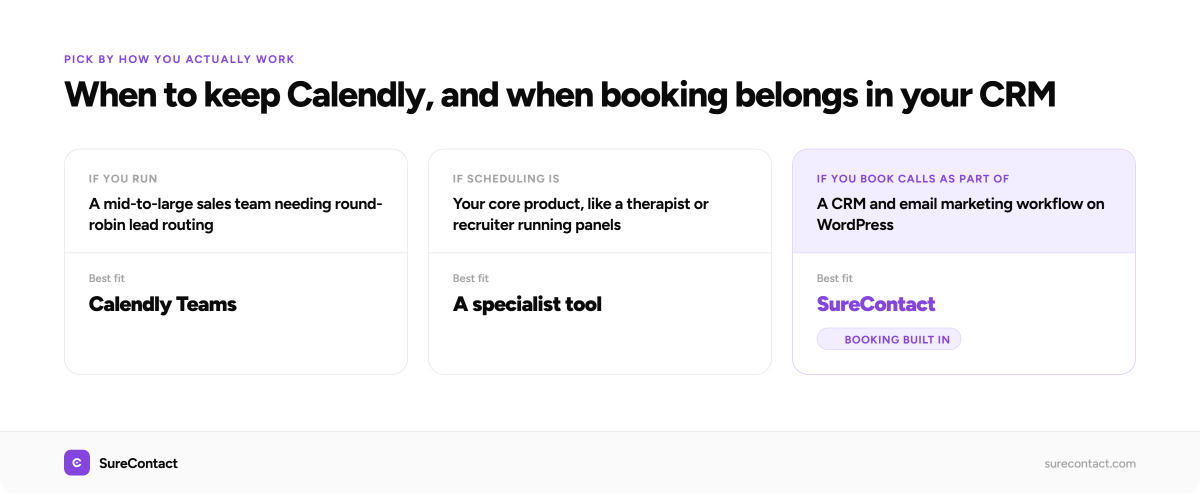
Calendly is still the right choice in specific situations. If you run a mid-to-large sales team that needs round-robin lead distribution, Calendly Teams handles it well. If your team relies on Salesforce and needs native routing, Calendly’s enterprise tier was built for that.
SureContact’s booking system is built for the freelancer, consultant, coach, and small agency owner who books calls as part of a CRM and email marketing workflow, not as a standalone scheduling product. If scheduling is your core product, such as a therapist booking patient appointments or a recruiter running interview panels, specialist tools have more depth.
But if you book discovery calls, onboarding calls, or sales calls as part of a broader relationship workflow, the case for keeping scheduling separate from your CRM gets harder to justify the more you think through the integration work it requires.
How Do You Set Up Your First Booking in SureContact?
Here is the full flow for a discovery call booking, including the automation that fires after.
Step 1: Create your event type. In your SureContact workspace, go to Bookings and create a new event. Select Online Meeting, set the duration to 30 minutes, add a description for the invitee, and set your available hours.
Step 2: Share your booking link. SureContact generates a booking URL to share in emails, on your website, or on a landing page. Once the invitee confirms, the booking appears in your workspace and the contact is created.
Step 3: Build the pre-call sequence. In Sequences, create a short flow triggered by the booking. Day 0 is the confirmation email. The day before the call sends a reminder with the details. This runs automatically for every booking.
Step 4: Set up the post-call follow-up. Create an automation triggered by a tag you apply after the call. When you tag a contact as “Call Complete”, the automation sends a follow-up email the next morning.
The full sequence of booking, confirmation, reminder, and follow-up runs without any integration work. The booking setup guide covers each step in detail.
One More Thing Worth Knowing
SureContact’s landing page builder supports embedding Calendly, Typeform, Tally, Loom, and Google Maps directly in your pages. If you are mid-migration and need both tools running at once, that works.
But if you use SureContact’s native booking, the embed is not needed. The landing page captures the lead, the form adds them as a contact, and the booking link is a URL you share. Everything stays in one place, and nothing needs to be wired together.
That is the clearest way to explain why SureContact is a different kind of Calendly alternative. Every other option here is a scheduling tool you connect to something else. SureContact is the something else, with booking built in.
Start for free and set up your first booking in the same session.
Frequently Asked Questions
Is there a free Calendly alternative? Yes. Cal.com is free and open source for most individual use cases. SureContact also has a free plan that includes booking alongside CRM and email features for up to 250 contacts, which suits solo users testing the workflow.
What is the cheapest Calendly alternative? For pure scheduling, TidyCal is the value pick at a one-time payment of around $29. If you also need a CRM and email marketing, SureContact at $12.50/month is cheaper than paying for Calendly plus a separate CRM and email tool.
Can I embed Calendly inside SureContact? Yes. SureContact’s landing page builder supports embedding Calendly, along with Typeform, Tally, Loom, and Google Maps. This is useful during a migration when you want both tools running at once.
What makes SureContact different from other Calendly alternatives? Every other tool on this list is a standalone scheduler that still needs to connect to your CRM and email platform. SureContact includes booking, CRM, email campaigns, automations, landing pages, and forms in one platform, so a booking becomes a contact and triggers your follow-up automatically.
