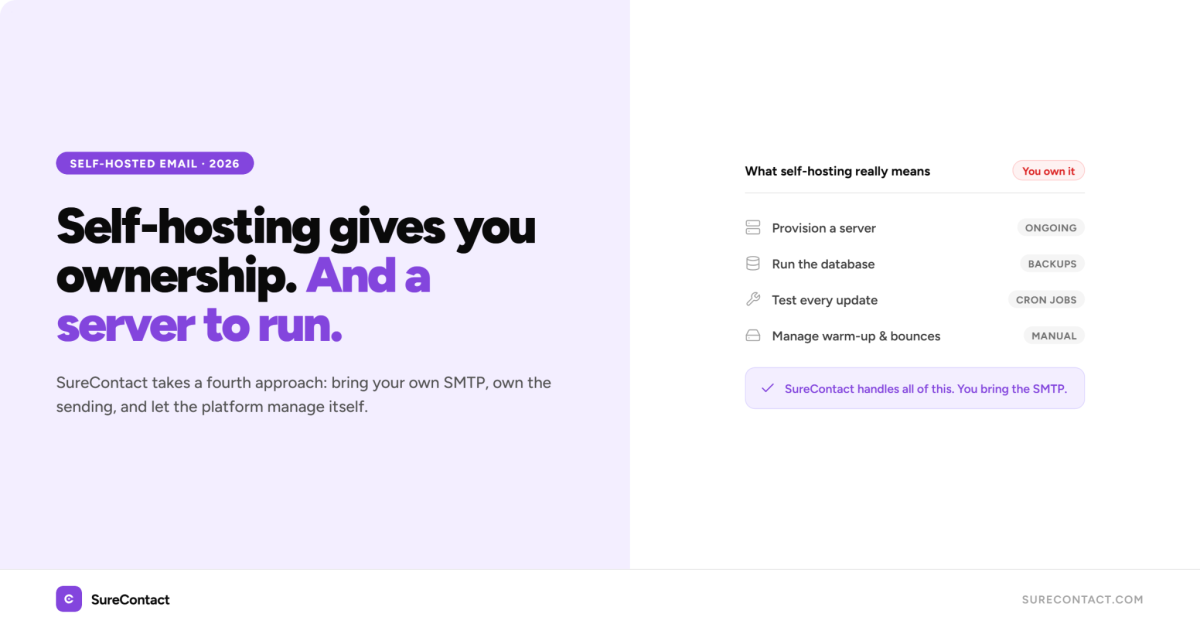
| Quick answer: Self-hosted email marketing means running your own email software on a server you control. Tools like Listmonk, Sendy, and Mautic do this. They give you full data ownership and no monthly fees, but they require server setup, SMTP configuration, and ongoing maintenance. SureContact takes a fourth approach: a managed WordPress CRM with a Lifetime plan that requires you to bring your own SMTP provider. You control the sending. The platform manages itself. |
At some point, the Mailchimp bill arrives and you realise it’s climbed again. Or a contact import hits the plan limit. Or you read about another account getting suspended for a policy you didn’t know existed. That’s usually when people start searching for self-hosted email marketing software, applications, and platforms, trying to find something they actually own.
That promise is real. But what these tools don’t always explain is what you’re signing up for when you take on the hosting yourself.
What Does ‘Self-Hosted Email Marketing’ Actually Mean?
Self-hosted email marketing means your email software runs on a server you control, whether that’s a VPS you rent, a dedicated server, or your own hardware. The software, the contact database, the campaign logic, and the sending records all live on that machine.
You’re responsible for installing and updating the software, configuring an SMTP service to actually send the emails, managing backups, and keeping the server running. If the server goes down, so does your email marketing.
This is different from hosted SaaS tools like Mailchimp or Brevo, where the software runs on their infrastructure and you just log in. It’s also different from WordPress plugins that run campaigns directly on your site’s server, which adds load to your hosting and slows your site during large sends.
What Are the Main Self-Hosted and BYOS SMTP Options?
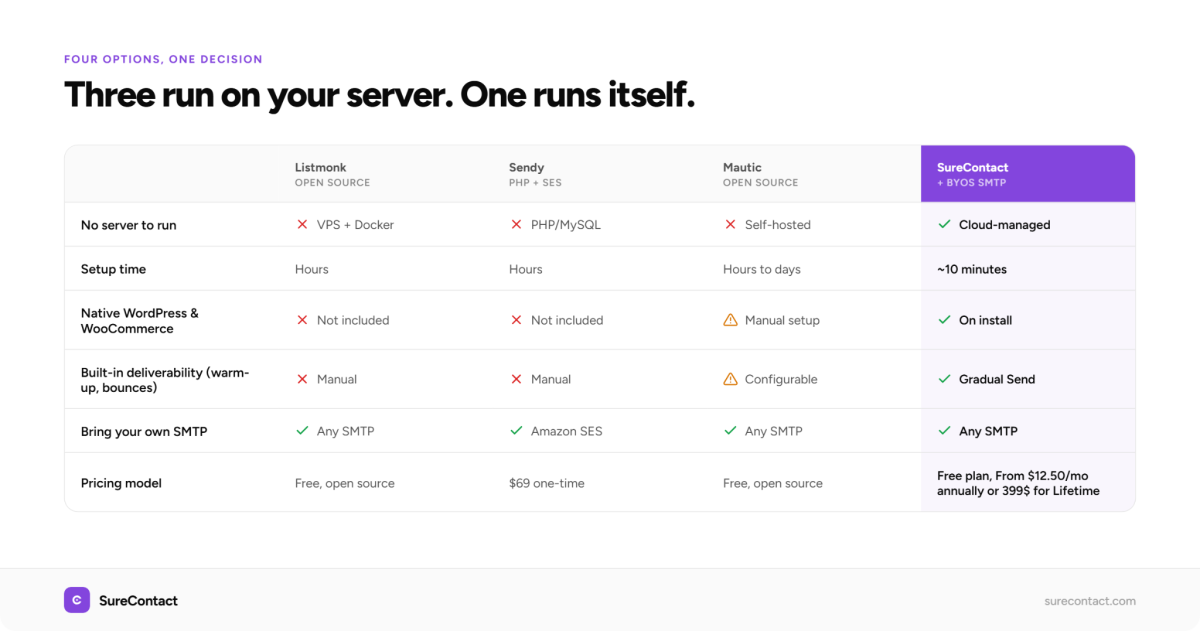
There are four options worth knowing, ranging from lightweight tools and single-purpose applications to full marketing platforms. Three require running your own server. The fourth gives you the same SMTP control through a managed WordPress-native platform.
Listmonk
Listmonk is open source and free. It runs as a single binary on a Linux server and connects to a PostgreSQL database. You deploy it via Docker or a VPS, configure an SMTP provider for sending, and manage updates yourself.
It handles lists, campaigns, transactional emails, and basic analytics well. The interface is clean. For developers who are already comfortable with Docker and command-line tools, it’s an excellent choice.
Sendy
Sendy is a one-time purchase ($69) that runs on your own PHP/MySQL server and sends through Amazon SES. Costs can drop to around $1 per 10,000 emails once you’re set up, which is genuinely hard to beat at scale.
The setup requires configuring Amazon SES with proper domain authentication, and you’ll handle bounce management, complaints, and list hygiene yourself. For high-volume senders with a technical resource available, the economics work well.
Mautic
Mautic is the most fully featured of the group. It’s open source, self-hosted, and covers email campaigns, automations, landing pages, forms, and CRM-style contact tracking.
It’s also the most demanding to run. The installation is involved, updates require testing before applying, and the server requirements are higher than the others. If you need a full marketing automation platform on your own infrastructure, Mautic delivers it.
SureContact (WordPress-native, BYOS SMTP)
SureContact is a Marketing CRM built for WordPress with a Lifetime plan that requires you to connect your own SMTP provider. Your sending infrastructure is yours: Amazon SES, Mailgun, Postmark, or any standard SMTP service. You own the sending. SureContact handles the platform, campaign logic, automations, WooCommerce sync, and contact management in the cloud.
The result is SMTP control without server administration. No cron jobs, no database to maintain, no update testing. The Lifetime plan is a one-time payment with no recurring fees, which is the same economic argument Sendy makes, but with a full WordPress CRM attached.
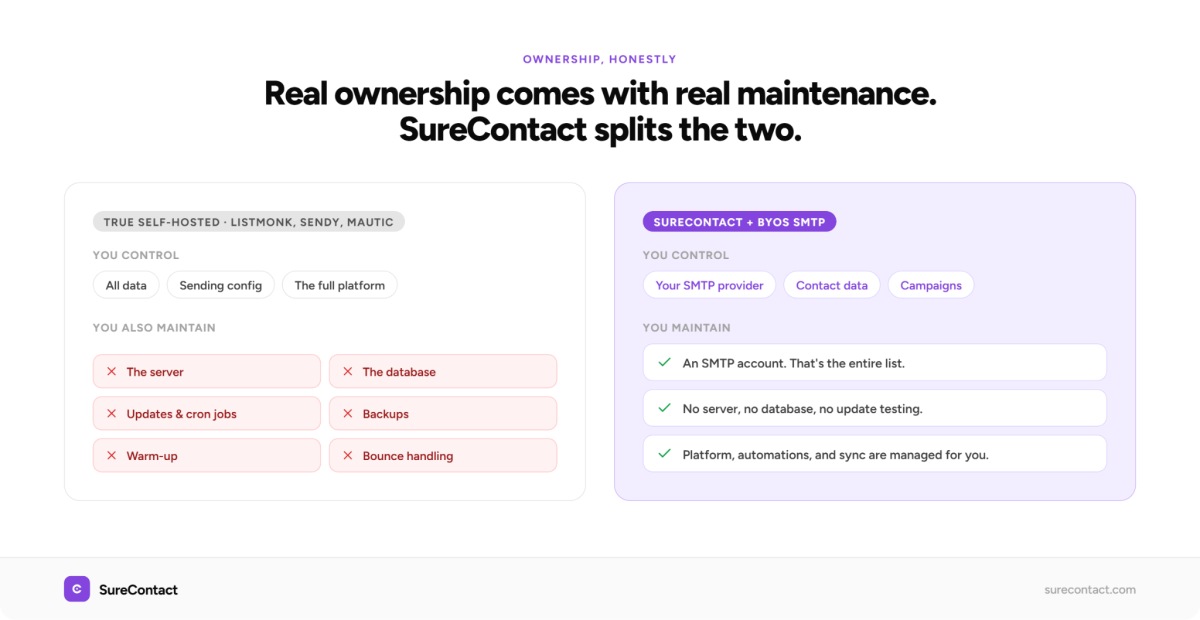
| What you control | What you maintain | |
| Listmonk | All data, sending config | Server, PostgreSQL, SMTP, updates |
| Sendy | All data, Amazon SES connection | PHP server, SES setup, bounce handling |
| Mautic | All data, full platform | Server, database, cron jobs, updates |
| SureContact + BYOS | SMTP provider, contact data, campaigns | SMTP account only. Platform managed for you. |
When Does True Self-Hosting Make Sense?
There are real situations where running your own server is the right call.
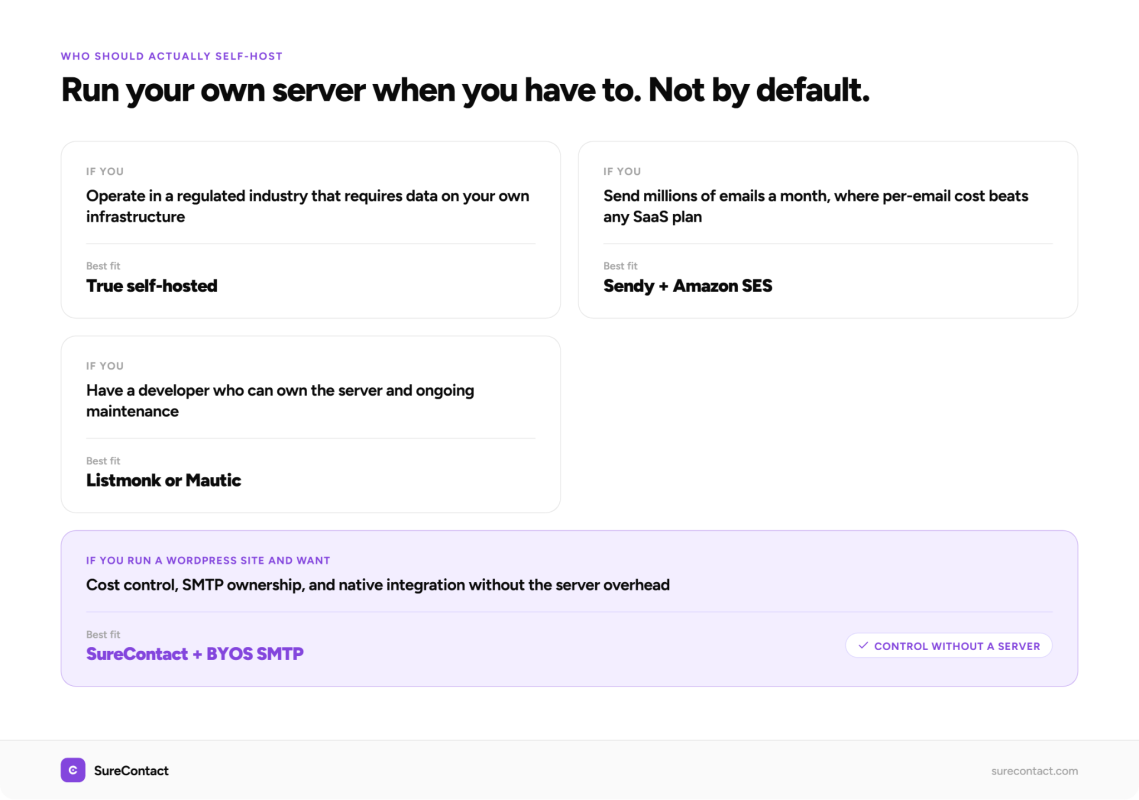
- You’re in a heavily regulated industry (healthcare, finance, legal) and your data governance policy requires everything on your own infrastructure.
- You send at very high volumes (millions of emails per month) and the per-email cost of SES or Mailgun is more economical than any SaaS plan.
- You have a developer on your team who can own the infrastructure and you’re comfortable with the ongoing maintenance responsibility.
- You’re building a multi-tenant email platform for clients, where you need to separate data at the infrastructure level.
Outside of these situations, the benefits of self-hosting start to look like the benefits of owning a car versus renting one. Real ownership, real maintenance.
What Do Most WordPress Site Owners Actually Want?
When most WordPress site owners search for self-hosted email marketing, what they’re really after is one or more of these:
- No escalating monthly fees as their list grows
- Control over their own sending, not being at the mercy of a platform that can suspend their account
- Email marketing that connects natively to their WordPress site, WooCommerce, and their existing tools
- Campaigns that run without putting load on their WordPress hosting
These are all legitimate. None of them require running your own server.
What they require is a tool with a sensible pricing model, the option to bring your own SMTP (BYOS) for sending control, and a native WordPress integration. That’s a different kind of ownership from server administration.
How Does SureContact Give You That Control Without a Server?
SureContact is a Marketing CRM built for WordPress. Campaigns and automations run in the cloud, which means they don’t touch your WordPress server or slow your site down. But the part relevant to self-hosting is this: you can connect your own SMTP provider on any plan.
That means you bring Amazon SES, Mailgun, Postmark, Brevo, or any other SMTP service you choose. SureContact handles the campaign logic, contact management, automations, and reporting. Your SMTP provider handles the actual sending. You’re not locked into SureContact’s infrastructure for delivery.
Lifetime plan users connect their own SMTP provider. Monthly and Annual plans include SureContact’s built-in sending domain as an option, so you can start sending immediately and switch to your own SMTP whenever you’re ready. Full setup instructions are in the SureContact SMTP documentation.
How Does Gradual Send Protect Your Deliverability?
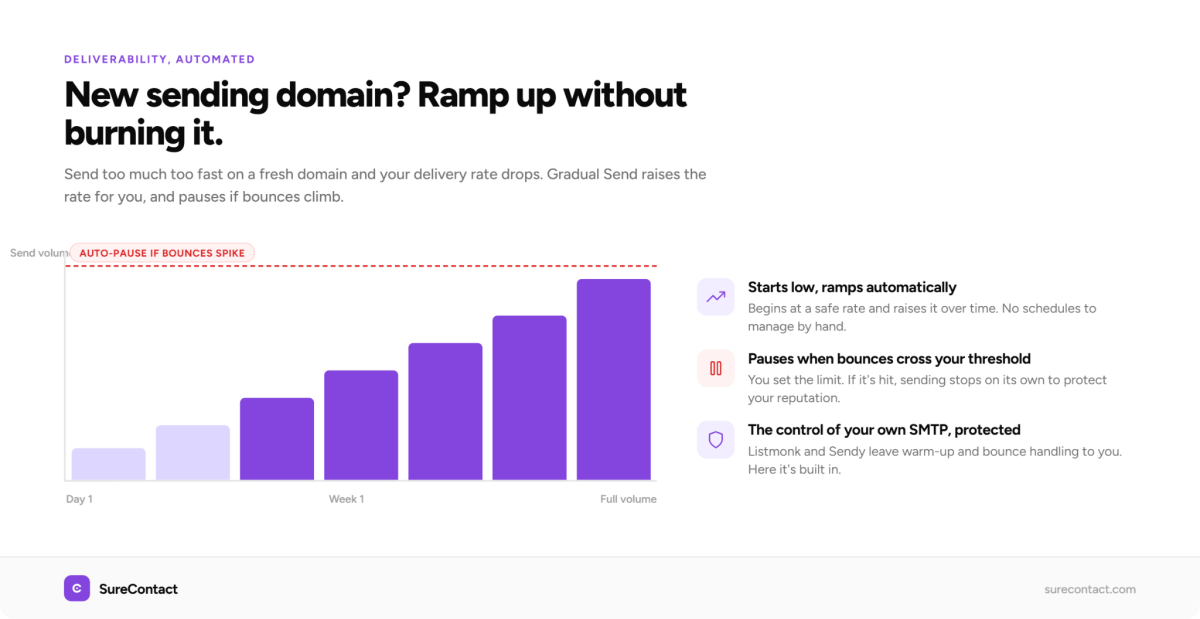
One of the real deliverability risks when you bring your own SMTP is warming up a new domain. Send too many emails too fast and your delivery rate drops.
SureContact’s Gradual Send feature handles this automatically. It starts at a lower sending rate and ramps up over time. If your bounce rate crosses a threshold you set, it pauses automatically. You get the control of your own SMTP with deliverability protection built in, without having to manage warm-up schedules manually.
This is something the true self-hosted tools don’t include by default. With Listmonk or Sendy, bounce handling and warm-up logic is your responsibility.
What Connects Natively to WordPress?
SureContact installs as a WordPress plugin and connects to WooCommerce, SureCart, Easy Digital Downloads, SureForms, Gravity Forms, WPForms, JetFormBuilder, CartFlows, and SureMembers directly.
Every order, form submission, membership event, or purchase automatically creates or updates a contact in SureContact. You can segment by purchase history, product category, or membership status and trigger email sequences from those events.
The WooCommerce integration, including product category targeting that shipped in March 2026, is documented at the SureContact integrations page.
How Do You Set Up Your Own SMTP in SureContact?
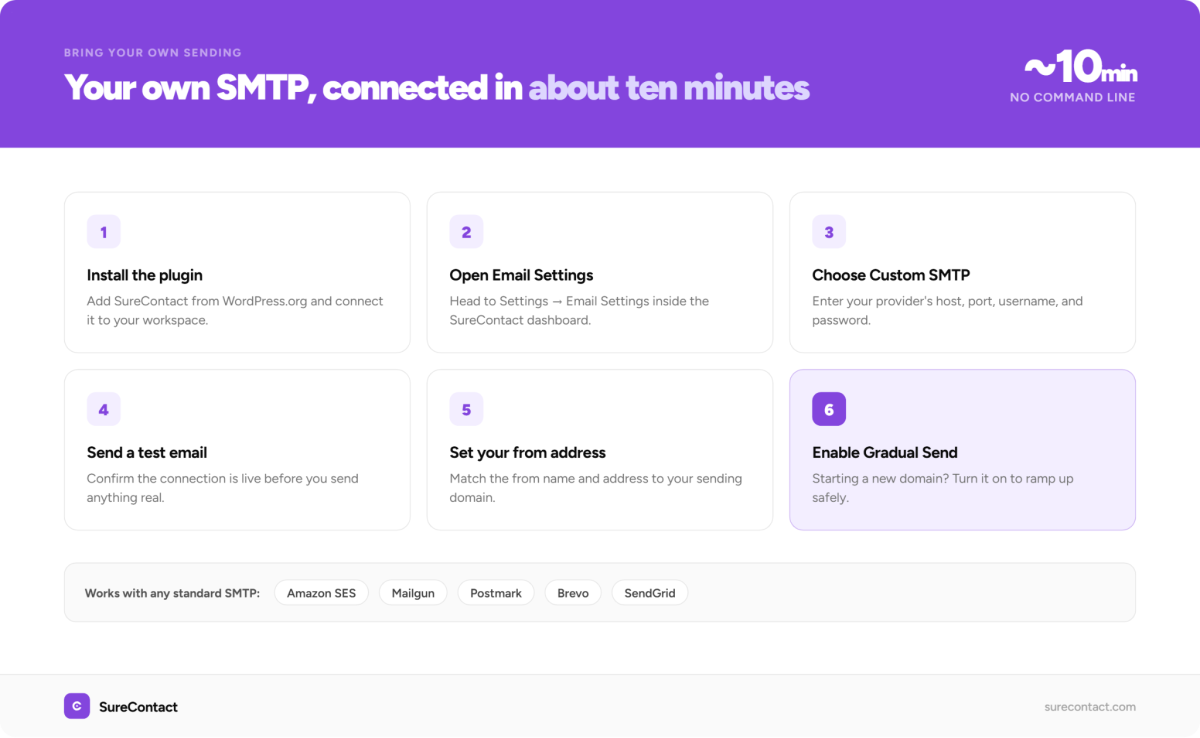
The setup takes around 10 minutes once you have your SMTP provider credentials ready.
- Install the SureContact plugin from WordPress.org.
- Connect the plugin to your SureContact workspace from the WordPress admin menu.
- Go to Settings, then Email Settings inside your SureContact dashboard.
- Choose ‘Custom SMTP’ and enter your provider’s host, port, username, and password.
- Send a test email to confirm the connection is working.
- Set your from name and from address to match your domain.
- If you’re starting a new sending domain, enable Gradual Send to ramp up safely.
Full step-by-step guide: Setting up SMTP in SureContact. Compatible providers include Amazon SES, Mailgun, Postmark, Brevo, SendGrid, and any provider that supports standard SMTP credentials.
Which Option Is Right for You?
Here’s the honest breakdown.
| True self-hosted (Listmonk, Sendy) | SureContact + BYOS SMTP | |
| Data location | Your server | SureContact cloud + your SMTP provider |
| Setup time | Several hours to days | 10-30 minutes |
| WordPress integration | Manual or plugin required | Native plugin, connects on install |
| WooCommerce sync | Not included | Automatic, with product category targeting |
| Automations | Basic (Listmonk), full (Mautic) | Full, cloud-based, no server load |
| Maintenance | You own it | SureContact team handles it |
| Deliverability tooling | Manual warm-up, bounce handling | Gradual Send, built-in bounce handling |
| Pricing model | One-time (Sendy) or free (Listmonk, Mautic) | Free plan + paid from $12.50/mo or Lifetime |
| Best for | Devs, regulated industries, high-volume sends | WordPress site owners who want control |
If you run a WordPress site and what you actually want is cost control, SMTP ownership, and a tool that connects to your existing stack, SureContact covers all of it without the server overhead.
Start free at surecontact.com. The free plan includes all core features for up to 250 contacts.
A few questions that come up regularly on this topic.
Frequently Asked Questions
Do I need a developer to set up a self-hosted email marketing platform?
It depends on which platform you choose. Listmonk and Mautic require server access, command-line comfort, and ongoing maintenance. Sendy needs a PHP/MySQL server and Amazon SES configuration. If you don’t have a developer available, these take real time to set up correctly.
SureContact is the exception. It installs as a WordPress plugin in minutes and connects to your SMTP provider through a settings screen. No server access, no command line, no cron jobs. It’s the only option on this list where a non-technical WordPress site owner can be up and sending the same day.
How is a self-hosted email marketing application different from a WordPress plugin?
A true self-hosted email marketing application runs on a server you control, separate from your WordPress site. Your WordPress site and your email software are two different systems. With a WordPress plugin approach like SureContact, the plugin lives in WordPress but the actual sending and campaign logic runs in the cloud. You get the WordPress integration without the server administration.
Can I use Amazon SES with SureContact?
Yes. SureContact works with Amazon SES, Mailgun, Postmark, Brevo, SendGrid, and any provider that supports standard SMTP credentials. You enter your provider’s host, port, and authentication details in the Email Settings section.
Does SureContact store my emails on my server?
No. SureContact runs in the cloud. Your WordPress site hosts the plugin, but campaign sending, contact storage, and automation logic run on SureContact’s infrastructure. This keeps your WordPress server free of campaign load.
What happens to my contacts if I stop using SureContact?
You can export all contacts at any time as a CSV. SureContact doesn’t lock your data. The export option is available in the Contacts section of your dashboard.
Is SureContact open source?
The SureContact WordPress plugin is available on WordPress.org. The cloud platform it connects to is a managed SaaS service, not open source. For a fully open source alternative, Mautic is the most comparable option in terms of features.
Does SureContact work with non-WordPress sites?
Yes. You can add contacts via CSV import, the API, webhooks, or OttoKit. The WordPress plugin is the fastest setup path, but SureContact works as a standalone email marketing and CRM platform for any site.