
Quick answer:
The best SendGrid alternatives for WordPress in 2026 are SureContact SMTP, Brevo, Mailgun, Postmark, and MailerSend. SureContact is the only option built natively intoWordPress with managed IPs, bounce handling, and a CRM included at every plan level without a need for separate plugin, warming the IP and a different billing account. Brevo and MailerSend are the strongest options if you need a permanent free tier to start.
If you run a WordPress site and use SendGrid, you already know the friction. There’s a plugin to install and maintain, a separate billing account to manage, IP warming to handle yourself, and a $89.95/month plan waiting the moment you need a dedicated IP.
That friction got worse in 2025 when SendGrid removed its permanent free plan and replaced it with a 60-day trial. After the trial, every site needs a paid plan. A lot of small WordPress sites that had been quietly running on the free tier needed to find something else.
SureContact SMTP was built to remove exactly this kind of overhead. This guide covers five alternatives worth switching to in 2026, evaluated on WordPress compatibility, setup experience, deliverability, and real pricing.
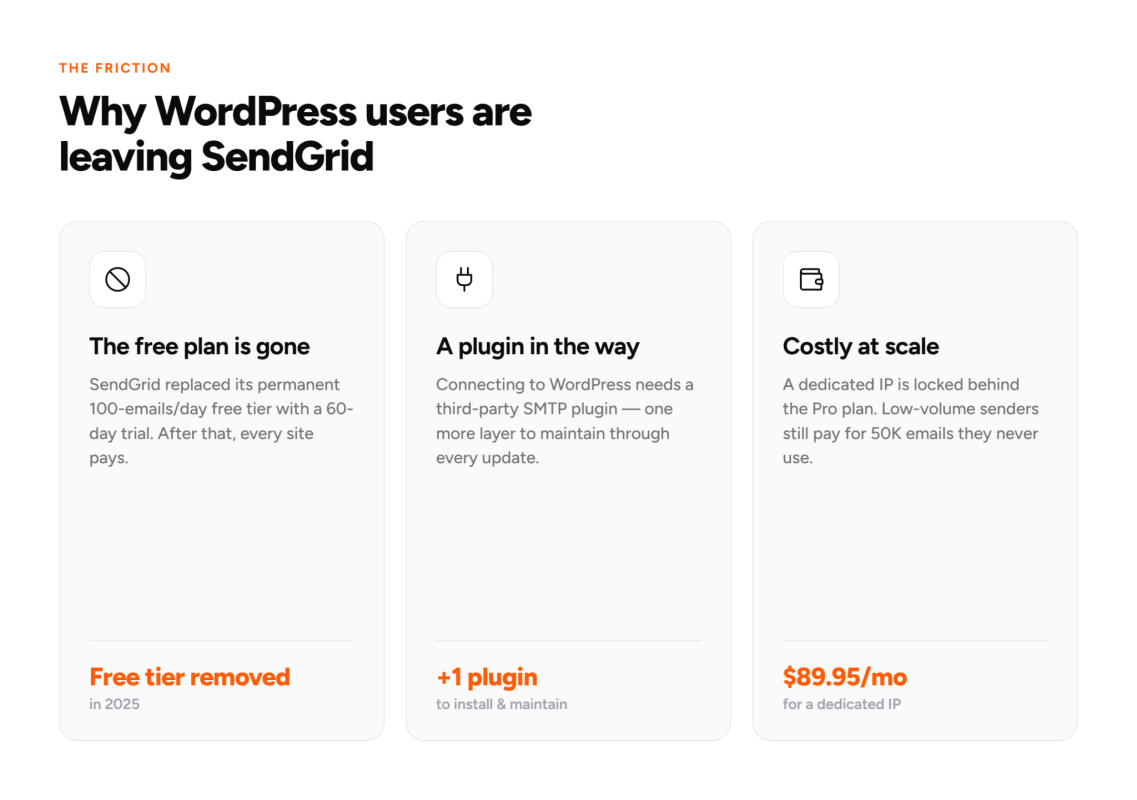
Why are WordPress users switching away from SendGrid?
Three things come up consistently.
First, the free plan removal. SendGrid’s permanent 100 emails/day free plan was a staple for small sites. The 60-day trial that replaced it doesn’t work as a long-term option for sites sending low-volume transactional email.
Second, the plugin dependency. Connecting SendGrid to WordPress requires a third-party SMTP plugin (WP Mail SMTP, FluentSMTP, or similar). These work reliably, but they add a layer to your stack and another thing to maintain through WordPress updates.
Third, the cost structure. The Essentials plan covers 50,000 emails for $19.95/month. For a WooCommerce store sending 10,000 to 15,000 emails per month, the effective rate is $1.33 to $2.00 per thousand because you pay for 50,000 whether you use them or not. A dedicated IP requires the Pro plan at $89.95/month.
What should a SendGrid alternative do for a WordPress site?
WordPress users need something different from what developers building SaaS apps need. For a WordPress site owner, the right alternative should:
- Connect without a separate plugin install, or have a native first-party plugin at minimum
- Handle SPF, DKIM, and DMARC setup without requiring you to create DNS records manually
- Manage IP reputation without a warmup schedule to run
- Show sending data and contact data in one place
- Price by volume rather than contact count, since WordPress sites often have large lists but irregular send frequency

The best SendGrid alternatives for WordPress in 2026
Each option below is ranked for WordPress users specifically, not developers building production applications.
1. SureContact SMTP
SureContact is the only option on this list built for WordPress from the start, not adapted to it. It’s a marketing CRM and SMTP relay service from the team behind Astra and SureCart, with the SMTP running on managed infrastructure: shared IPs monitored for reputation, bounce processing built in, and your sending dashboard in the same place as your contacts, automations, and campaigns.
Setup works the opposite way to every other provider here. SureContact generates your SPF, DKIM, and DMARC records for you. You paste them into your domain host. That’s the full setup. No plugin. No warmup schedule. No separate billing account.
The SMTP setup was redesigned in May 2026 with a cleaner two-tab layout separating external and internal sending providers, plus guided onboarding steps for new users. Most users go from signup to first send the same day.
Pricing: $5.90/month for 10,000 emails ($0.59/1K), $29.90/month for 50,000, $49.90/month for 100,000 emails ($0.49/1K). Non-expiring credit packs start at $29.50 for 50,000 emails. With SureContact you can manage contacts, automations, email sequences, campaigns, landing pages, and native forms in one dashboard all connected to your WordPress website.
Best for: WordPress and WooCommerce sites that want sending and CRM in one account, with no plugin dependency and no infrastructure to manage.
2. Brevo
Brevo (formerly Sendinblue) is the strongest option for WordPress users who need a permanent free tier before committing. The free plan covers 300 emails per day including transactional sends. Brevo has a first-party WordPress plugin, and paid plans start at $9/month.
The platform covers both transactional and marketing email: a campaign builder, automation workflows, and contact management are all included. Setup is a three-step process and the WordPress plugin handles DNS configuration.
Best for: WordPress sites on a tight budget that need a permanent free tier, or sites that want transactional and marketing email managed on one platform.
3. Mailgun
Mailgun is a developer-oriented email API service with strong deliverability and flexible routing. It’s the closest direct competitor to SendGrid, with an API-first approach, SMTP relay, detailed delivery analytics, and advanced routing options.
For WordPress, you’ll need an SMTP plugin and manual DNS configuration. There’s no native WordPress integration and no CRM included. Pricing starts at around $15/month for 10,000 emails. Dedicated IPs are available as an add-on.
Best for: Developers running WordPress who want API-level control over their sending infrastructure and are comfortable with manual configuration.
4. Postmark
Postmark focuses entirely on transactional email: order confirmations, password resets, account notifications. It’s the most commonly recommended option for WordPress sites that need near-certain inbox delivery on time-sensitive emails. Setup requires an SMTP plugin but is well-documented. Pricing starts at $15/month for 10,000 emails.
Postmark won’t send marketing campaigns or newsletters. For many WordPress sites, keeping transactional and marketing infrastructure separate is a deliberate choice that improves deliverability for both.
Best for: WordPress sites where transactional email reliability is the only requirement and campaigns are handled with a separate tool.
5. MailerSend
MailerSend is a newer transactional service with clean pricing and an easy interface. The free tier covers 3,000 emails per month permanently, one of the most generous free plans for low-volume transactional sending. At $5.60/month for 5,000 emails on paid plans, it’s competitive on unit cost. WordPress connection requires a standard SMTP plugin. No CRM or campaign builder is included.
Best for: WordPress sites with low-volume transactional sending that want simple pricing and no commitment to a full platform.

How does SureContact compare to SendGrid for WordPress?
The comparison comes down to what you’re buying beyond raw sending infrastructure.
| SureContact SMTP | SendGrid Essentials | |
|---|---|---|
| Price at 50K emails/mo | $29.90/mo | $19.95/mo |
| Price at 100K emails/mo | $49.90/mo | $89.95/mo (Pro required for dedicated IP) |
| WordPress plugin needed | No | Yes (third-party) |
| Managed IPs | Included at all tiers | Shared pool; dedicated IP needs Pro plan |
| IP warming required | No | Yes on shared IPs |
| DNS setup wizard | Yes — records generated for you | Manual configuration |
| Bounce handling | Built in | Requires configuration |
| CRM + campaigns included | Yes, every plan | No |
| Dedicated IP add-on | Not needed | $30/mo extra on Pro |
SendGrid is cheaper at 50,000 emails on the Essentials plan. SureContact is the better value at 100,000 emails ($49.90 vs $89.95/month) and includes the CRM, automations, sequences, and a landing page builder that would otherwise require a separate tool and separate billing.
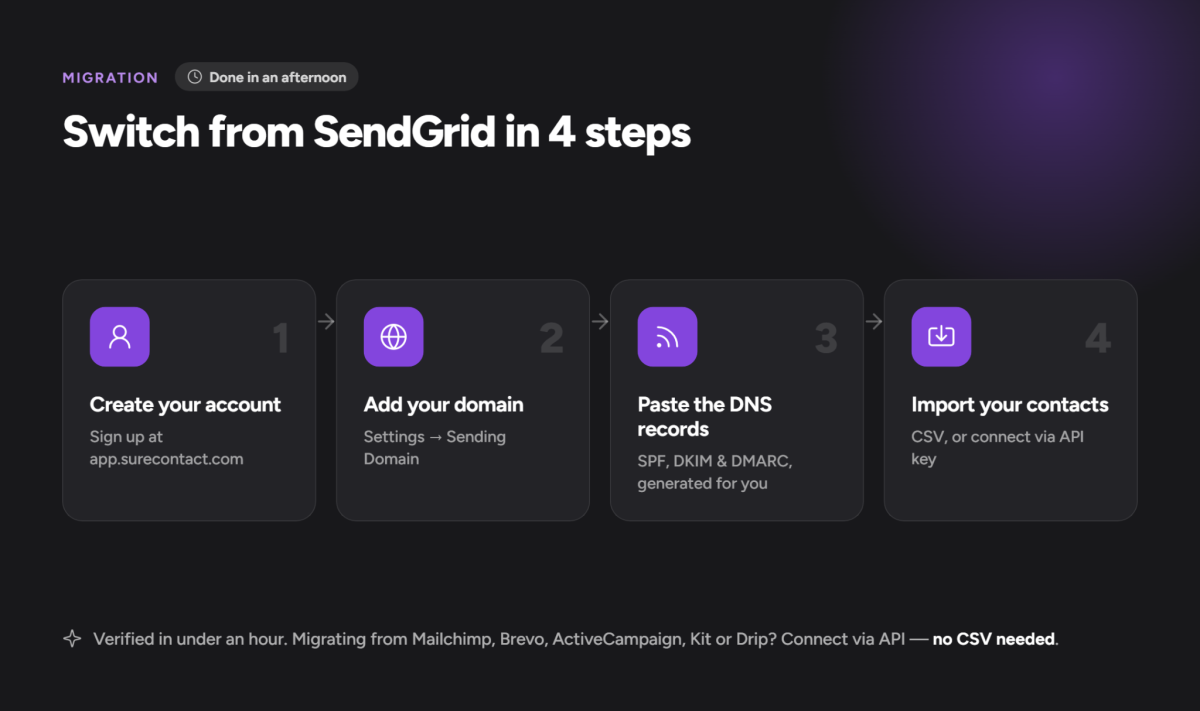
How do you switch from SendGrid to SureContact?
The migration takes an afternoon:
- Create a SureContact account at app.surecontact.com
- Go to Settings, then Sending Domain, and add your sending domain
- SureContact generates your SPF, DKIM, and DMARC records. Copy and paste them into your domain registrar’s DNS panel
- Once verified (usually under an hour), you can send from your domain immediately
- Export your SendGrid contacts as CSV and import into SureContact. If migrating from Mailchimp, MailerLite, Brevo, ActiveCampaign, Kit, or Drip, you can connect directly via API key. No CSV needed for those platforms.
Full setup guide: surecontact.com/docs
Which SendGrid alternative is right for your WordPress site?
If you want sending and CRM in one place with no plugin and no IP management, SureContact SMTP is the most direct fit. It’s the only option on this list with WordPress-native setup, managed infrastructure, and contact management bundled into the same account.
If you need a permanent free tier, Brevo is the most WordPress-friendly option. If your priority is pure transactional reliability and you’re happy managing campaigns elsewhere, Postmark is worth the cost. Mailgun and MailerSend fit developers who want API control or a clean low-volume transactional setup.
Pick the option that removes the most steps between your WordPress site and a sent email.
Frequently asked questions
Is SendGrid still free in 2026?
No. SendGrid replaced its permanent 100 emails/day free plan with a 60-day trial in 2025. After the trial expires, you need a paid plan. The entry plan is Essentials at $19.95/month for up to 50,000 emails.
What is the cheapest SendGrid alternative for WordPress?
Brevo and MailerSend both have permanent free tiers. Brevo covers 300 emails/day at no cost. MailerSend covers 3,000 emails/month. For paid plans, SureContact starts at $5.90/month for 10,000 emails and includes the full CRM, automations, and landing pages at that price.
Can I migrate from SendGrid to SureContact without losing contacts?
Yes. Export your contacts from SendGrid as a CSV and import them directly into SureContact. If you’re also migrating from Mailchimp, MailerLite, Brevo, ActiveCampaign, Kit, or Drip, SureContact connects directly via API key. No CSV export needed for those platforms.
Do I need a plugin to use SureContact SMTP with WordPress?
No. SureContact connects to WordPress natively. You add your sending domain inside the SureContact dashboard, paste two DNS records that SureContact generates for you, and you’re sending. No third-party SMTP plugin required.