
- Introduction to SureContact Dashboard
- How to Install and Connect the SureContact WordPress Plugin
- What Do Contact Fields Mean in the SureContact WordPress Plugin
- How to Invite Members to a Workspace in SureContact
- How to Switch Organizations in SureContact
- Workspace-Level Contact Allocation in SureContact
- Workspace-Level Timezone Settings in SureContact
- How to Add a Custom Tracking Domain in a Workspace in SureContact
- SureContact MCP Server
- Creating Forms in SureContact
- Setup SMTP in SureContact
- Email Campaigns in SureContact
- How to Add a Preferences URL in Your Emails
- How to Share Email Templates in SureContact
- Spintax Feature in SureContact
- Deleting Sent Campaigns in SureContact
- A/B Testing Integration Guide
- Unsubscription Guide
- SureContact SMTP Setup Guide
- SMTP Routing User Flow
- FluentCRM Integration with SureContact
- SureContact Third-Party Integration — Step-by-Step Guide
- Fluent Forms Integration with SureContact
- SureForms Integration with SureContact
- WPForms Integration with SureContact
- Bulk Sync WordPress Users to SureContact
- Contact Form 7 Integration with SureContact
- Sync WooCommerce Customers with SureContact
- FluentCart & FluentCommunity Integration With SureContact
FluentCart & FluentCommunity Integration With SureContact
You don’t need a separate integration to use FluentCart or FluentCommunity with SureContact. Both plugins create regular WordPress user accounts, and SureContact’s built-in WordPress connection automatically turns those accounts into contacts, so your customers and community members show up in SureContact without any extra setup on their end.
This guide walks through the settings to turn on, exactly how the sync works step by step, what information comes across, and what to check if someone isn’t showing up as a contact.
01 What’s Covered
| Plugin | Status | Why |
| FluentCommunity | Fully covered | Every member is a WordPress user, created automatically at signup, so there’s no case where a member exists without an account. |
| FluentCart | Covered with conditions | A WordPress user is created after a successful payment, but only if your account-creation setting allows it. Subscription orders always create one. |
One thing this doesn’t cover either way: order and revenue data from FluentCart. SureContact syncs the people, not the purchases, so you can email and segment your customers, but not by what they bought.
02 Settings to Turn On
If contacts aren’t showing up, it’s almost always one of the two settings below; both are turned off by default.
1. Auto-Create Contacts on Registration
SureContact → Settings → Sync Settings → Auto-Create Contacts on Registration
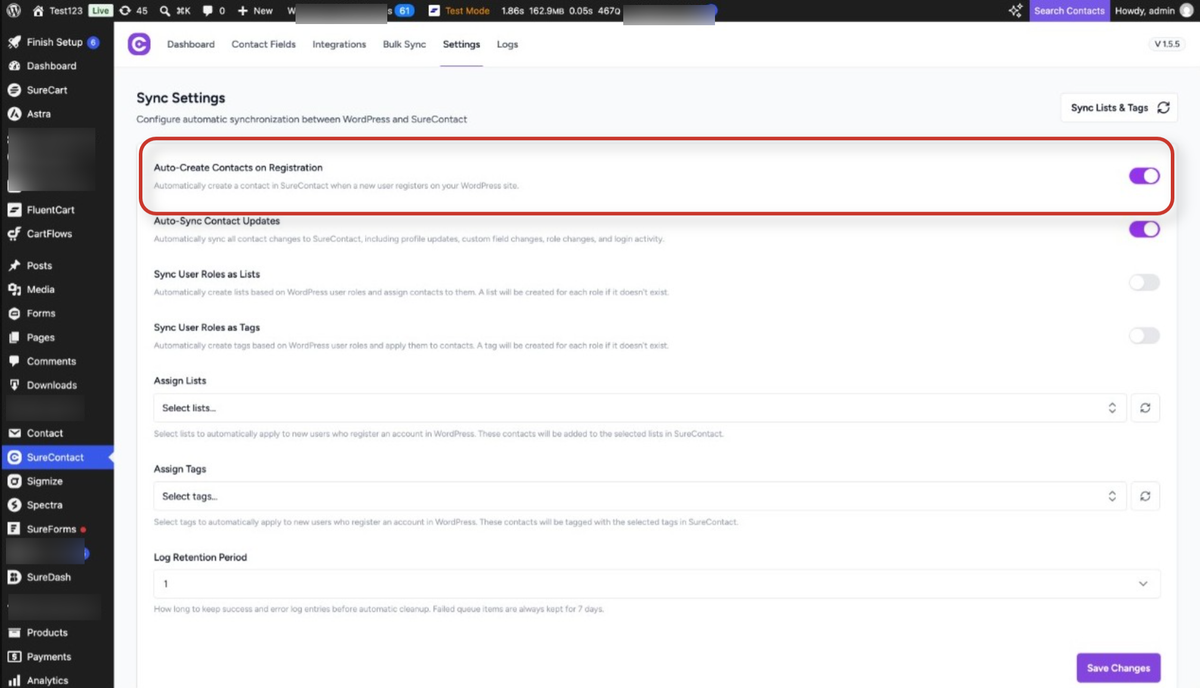
Turn this on so SureContact picks up new user registrations from FluentCart, FluentCommunity, or anywhere else on your site. Without it, new sign-ups and buyers are ignored.
2. Auto-Sync Contact Updates (recommended)
SureContact → Settings → Sync Settings → Auto-Sync Contact Updates
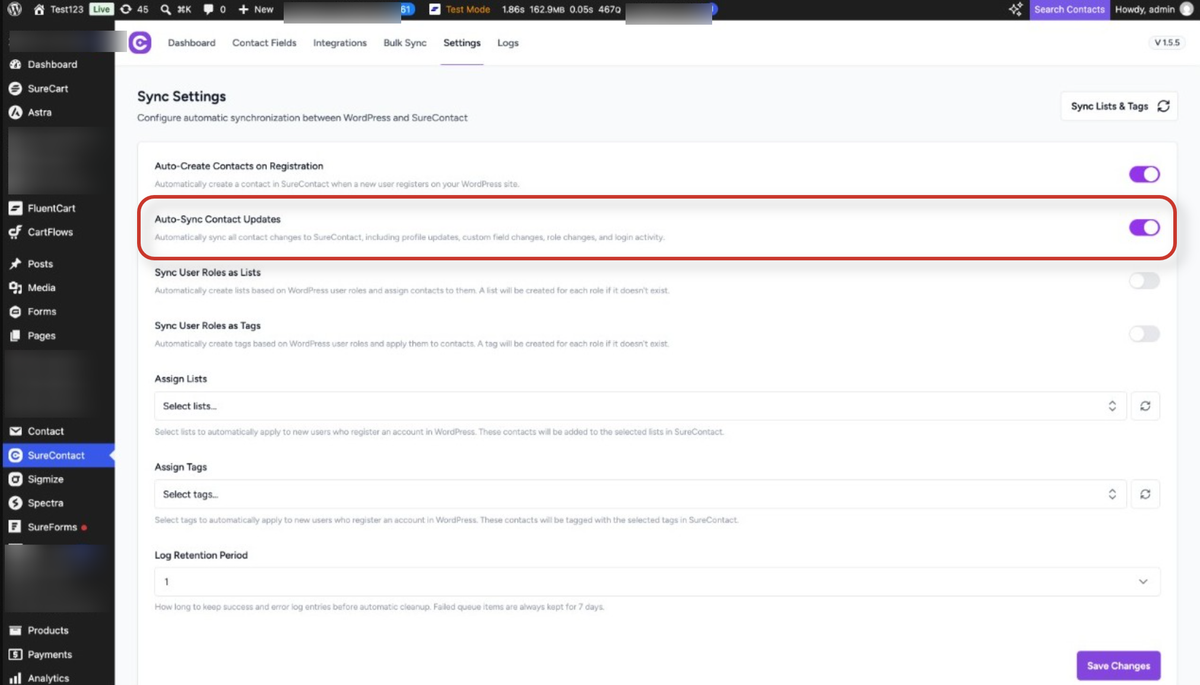
Turn this on so later profile changes, custom fields, and role changes keep syncing too, useful if you expect edits made to a customer’s profile to reach SureContact.
3. FluentCart only: User Account Creation Mode
FluentCart → Settings → Cart & Checkout → User Account Creation Mode
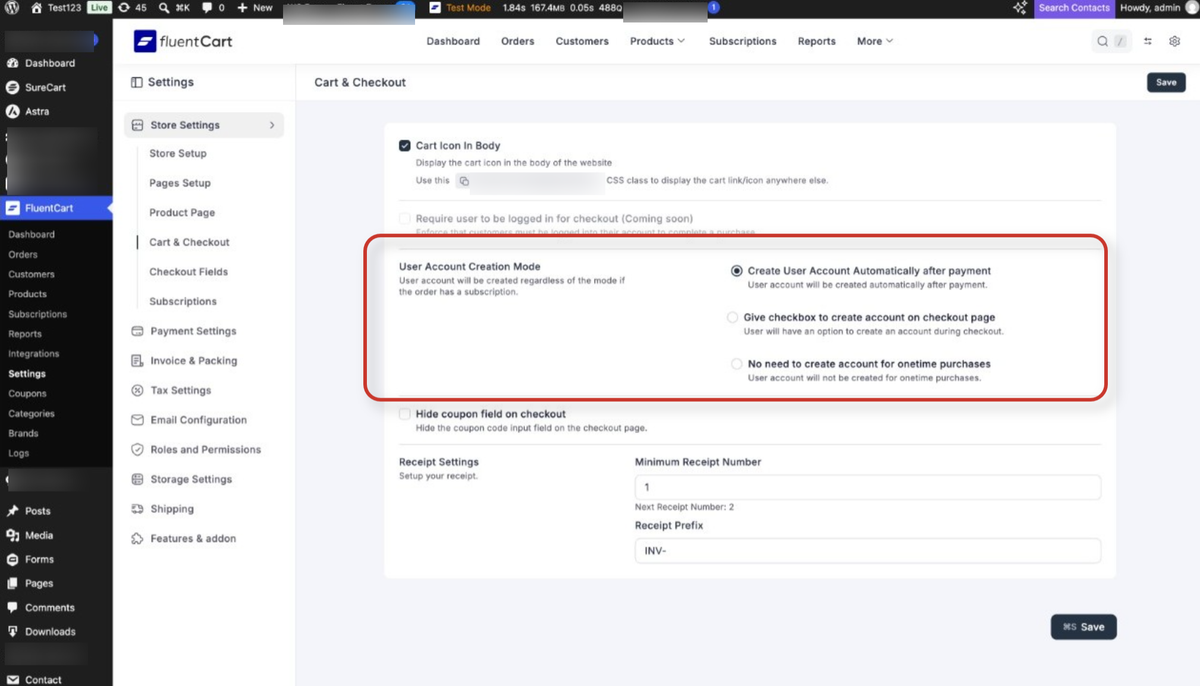
This setting decides whether your buyers become WordPress users at all, which in turn decides whether they become SureContact contacts. See the three options below.
⚠ If you can’t find it by that menu path, search your store settings for “User Account Creation Mode”, FluentCart moves settings between releases.
03 How the Sync Works, Step by Step
Here’s exactly what happens, from someone signing up or buying on your site to appearing as a contact in SureContact.
1. Someone registers or checks out on your site
- FluentCommunity: joining a space or community triggers signup.
- FluentCart: completing checkout on your store.
2. The plugin decides whether to create a WordPress user
- FluentCommunity always creates one; there’s no way around it.
- FluentCart only creates one if your User Account Creation Mode allows it, and only after payment succeeds (not at checkout; pending, failed, or abandoned orders don’t create an account).
- If the buyer’s email already matches an existing WordPress user, FluentCart links to that account instead of creating a new one, so no new contact appears, because that person is already synced.
3. SureContact picks up the new user
- With Auto-Create Contacts on Registration turned on, SureContact creates a matching contact, capturing name, email, role, username, registration date, website, and locale.
- Role can also map to lists or tags if you turn on “Sync User Roles as Lists / Tags” in SureContact. Note that both plugins use the same default role, so role alone won’t tell you a buyer apart from a community member.
4. Later changes keep syncing (if you’ve turned it on)
- With Auto-Sync Contact Updates on, profile edits and role changes made afterward keep flowing through automatically.
5. Bring across people who signed up before you turned this on
- Turning on auto-create only affects new sign-ups from that point forward. In SureContact, run the “Users” sync, “Synchronize all WordPress users to SureContact in the background”, to bring across everyone who already has an account.
- This brings in every existing FluentCart customer and FluentCommunity member who has an account, but not guest buyers, since they never had one.
04 FluentCart’s Three Account Modes
Only the first option gives you full contact coverage. It’s FluentCart’s default, so most stores are already set up this way, but it’s worth checking rather than assuming.
| Setting in FluentCart | One-time purchase | Subscription | Result in SureContact |
| Create User Account Automatically after payment (default) | User created | User created | Every paying customer becomes a contact |
| Give checkbox to create account on checkout page | Only if buyer ticks the box | User created | Buyers who skip the checkbox are missed |
| No need to create account for one-time purchases | No user | User created | One-time buyers never sync |
05 What Syncs, and What Doesn’t
A quick reference for what information actually comes across, so you know what to expect.
| Data | Synced? | Notes |
| Email, first name, last name | Yes | Both plugins pass these into the WordPress user record. |
| Username, registration date, website, locale | Yes | Standard WordPress user fields. |
| User role → lists or tags | Yes | Requires “Sync User Roles as Lists / Tags”. |
| Later profile edits | Yes | Requires Auto-Sync Contact Updates. |
| Existing users (backfill) | Yes | Run the bulk “Users” sync. |
| Billing/shipping address, phone, company, VAT | No | Kept in FluentCart’s own tables, not the WP user profile. |
| Orders, revenue, LTV, refunds, subscriptions | No | The real gap — nothing sends purchase data to SureContact. |
| Abandoned cart | No | FluentCart has no abandoned-cart feature to hook into. |
| Community/course membership as lists or tags | No | Not visible to the WordPress connection. |
06 If Someone Isn’t Showing Up as a Contact
Work through these in order.
1. Check that Auto-Create Contacts on Registration is turned on
This is the most common cause. Turning it on only affects sign-ups from that point forward; run the bulk “Users” sync to bring across everyone from before.
2. Check that your site’s connection to SureContact is healthy
If it’s disconnected, reconnect it before checking anything else.
3. FluentCart only: check your User Account Creation Mode
If it’s set to the checkbox option or to subscriptions-only, guest buyers won’t have a WordPress account, so there’s nothing for SureContact to sync. Switching to automatic account creation fixes this for future orders.
4. Confirm the order actually completed payment
A pending or failed order doesn’t create an account yet, so it won’t create a contact either. Check against an order that was fully paid.
5. Check whether a WordPress user exists for that person
Look under Users in your WordPress admin. If the user account exists but no matching contact appears in SureContact, get in touch with our support team with the details, and we’ll help you sort it out.
6. Looking for order or revenue data specifically?
That’s not something that syncs today; order totals, revenue, and purchase history stay in FluentCart. SureContact can sync the people, just not what they bought.
07 Need Help?
If you run into anything not covered here, our support team is happy to help. Reach out any time by dropping an email to [email protected], and we’ll walk through it with you.
We don't respond to the article feedback, we use it to improve our support content.