
- Introduction to SureContact Dashboard
- How to Install and Connect the SureContact WordPress Plugin
- What Do Contact Fields Mean in the SureContact WordPress Plugin
- How to Invite Members to a Workspace in SureContact
- How to Switch Organizations in SureContact
- Workspace-Level Contact Allocation in SureContact
- Workspace-Level Timezone Settings in SureContact
- How to Add a Custom Tracking Domain in a Workspace in SureContact
- SureContact MCP Server
- Creating Forms in SureContact
- Create Forms & assign lists & tags
- Multi Language Support(WordPress)
- Page Visit Tracking Guide (WordPress)
- Forms Custom Fields Sync Guide
- Landing Pages User Flow Guide
- SureContact Organization Workspace Setup Guide
- Companies User Flow Guide
- FAQs
- Bulk Operations SureContact
- SureContact Double Opt-In Guide
- SureContact API Keys Guide
- SureContact 2FA User Guide
- SureContact Bookings User Flow Guide
- SureContact MultiStep Forms Guide
- Zoom Integration with SureContact
- Group Booking User Flow Documentation
- Global Search – User Flow Documentation
- Folders in SureContact
- SureContact Email Tracking Pixel Regulations
- Email Open Tracking Consent SureContact
- Forms Custom Success Message Redirect Guide
- Partial Form Submission Guide
- Shopify Integration with SureContact Guide
- Migrate to Unified Preference Page
- Setup SMTP in SureContact
- Email Campaigns in SureContact
- How to Add a Preferences URL in Your Emails
- How to Share Email Templates in SureContact
- Spintax Feature in SureContact
- Deleting Sent Campaigns in SureContact
- A/B Testing Integration Guide
- Unsubscription Guide
- SureContact SMTP Setup Guide
- SMTP Routing User Flow
- FluentCRM Integration with SureContact
- SureContact Third-Party Integration — Step-by-Step Guide
- Fluent Forms Integration with SureContact
- SureForms Integration with SureContact
- WPForms Integration with SureContact
- Bulk Sync WordPress Users to SureContact
- Contact Form 7 Integration with SureContact
- Sync WooCommerce Customers with SureContact
- FluentCart & FluentCommunity Integration With SureContact
Multi Language Support(WordPress)
SureContact is now available in 5 languages in addition to English. The entire plugin interface i.e admin screens, notifications, integration setup, and form elements, is fully translated, making the plugin accessible to a wider global audience.
This guide explains how language support works, how to configure it at the site and per-user level, and what areas of SureContact are covered by the translations.
1. Supported Languages
SureContact supports the following languages out of the box:
| Language | Locale |
| English | en_US |
| Spanish | es_ES |
| French | fr_FR |
| German | de_DE |
| Portuguese | pt_PT |
| Italian | it_IT |
2. Setting Your Site Language
Language support is fully automatic – SureContact follows your WordPress language settings with no additional configuration needed.
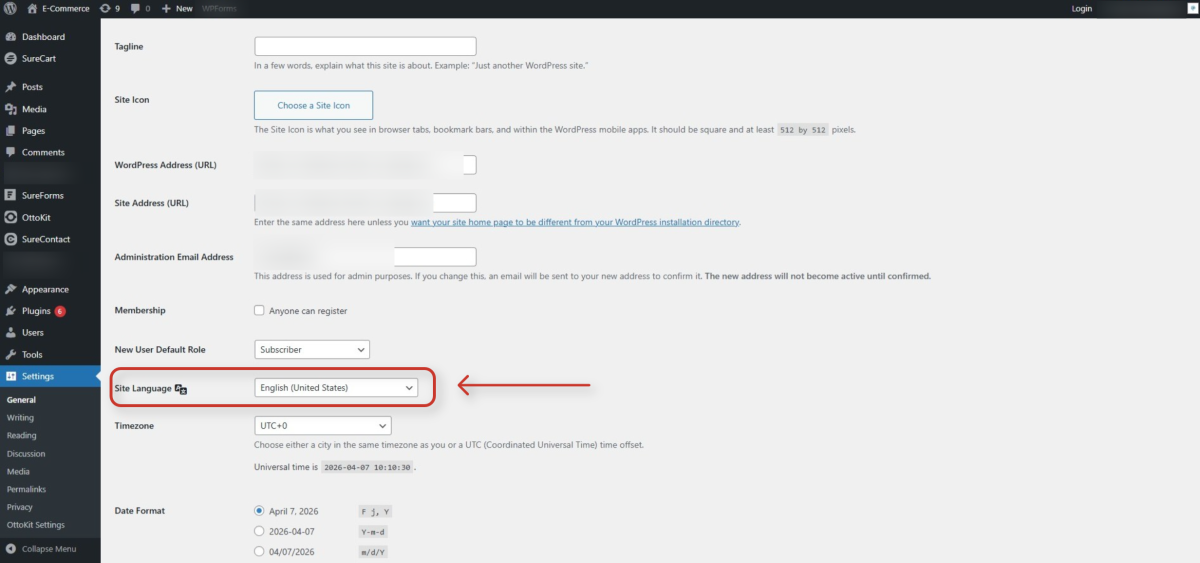
1. Go to Settings → General in your WordPress admin.
- In the left sidebar, click Settings, then select General from the sub-menu.
2. Find the Site Language dropdown.
- Scroll down to the Site Language field, which is located below Membership and New User Default Role.
3. Select your preferred language from the list.
- Choose from English (United States), Spanish, French, German, Portuguese, or Italian.
4. Click Save Changes.
- SureContact will immediately display in the selected language on your next page load.
3. Setting a Per-User Language
WordPress supports individual language preferences per admin user. This means different team members can each see SureContact in their own language without affecting the site-wide setting or your visitors.
1. Go to Users → Profile.
- In the WordPress admin sidebar, click Users, then select Profile. Alternatively, click your name in the admin bar at the top of the screen.
2. Find the Language dropdown under Personal Options.
- The Language field appears in the Personal Options section near the top of the profile page.
- It defaults to Site Default, which inherits the site-wide language setting.
3. Select the language you prefer.
- Choose your preferred language from the dropdown. All six supported languages are available.
4. Click Update Profile.
- Your chosen language takes effect immediately for your admin session only.
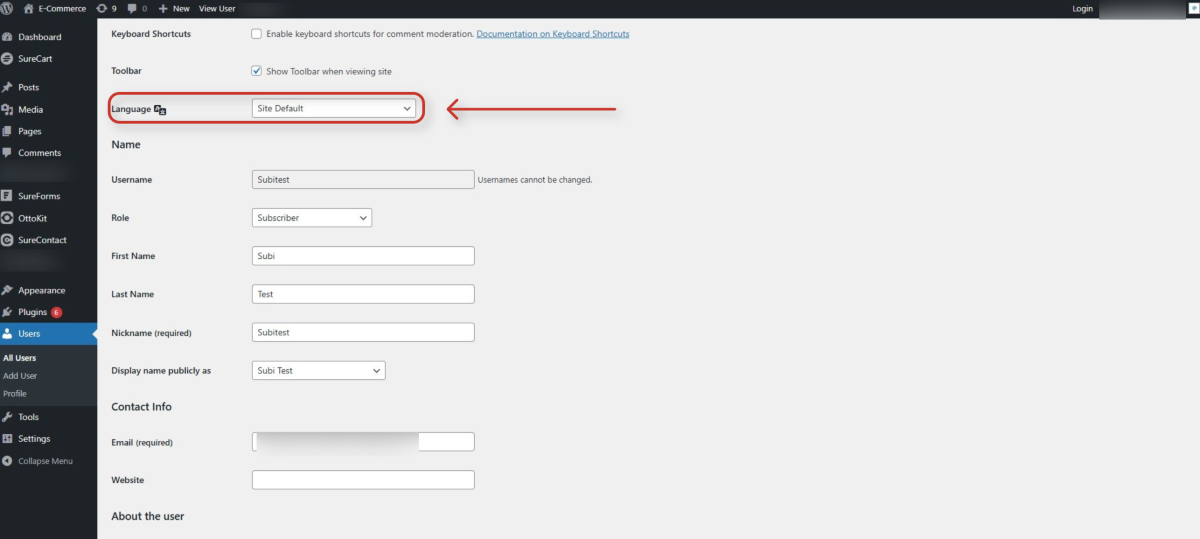
Note: The per-user language setting overrides the site-wide language for that user only. Other users and the frontend of your WordPress site are not affected.
4. What’s Translated
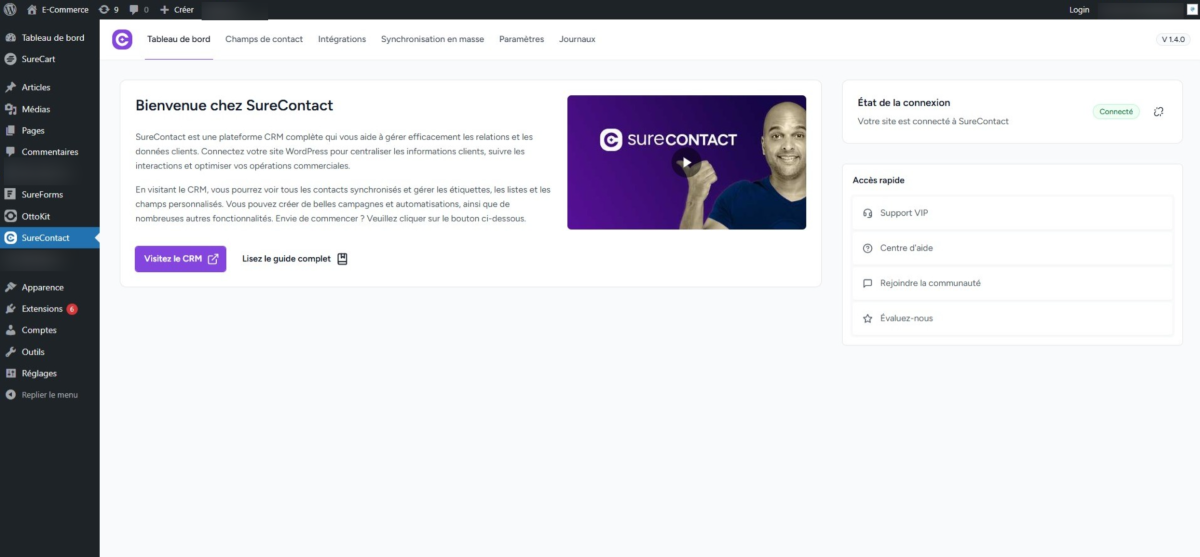
The entire SureContact plugin interface is translated – over 900 strings across both the backend and frontend, covering admin screens, integration setup, notifications, form elements, empty states, and accessibility labels.
The screenshot below shows the SureContact dashboard rendered in French, demonstrating the breadth of the translated interface:
Need Help?
If you need any assistance, please email [email protected], and our support team will be happy to help you.
We don't respond to the article feedback, we use it to improve our support content.